EasyManua.ls Logo

Blaupunkt MVP 01 - Page 5

Blaupunkt MVP 01
63 pages
Print Icon
To Next Page IconTo Next Page
To Previous Page IconTo Previous Page
Loading...
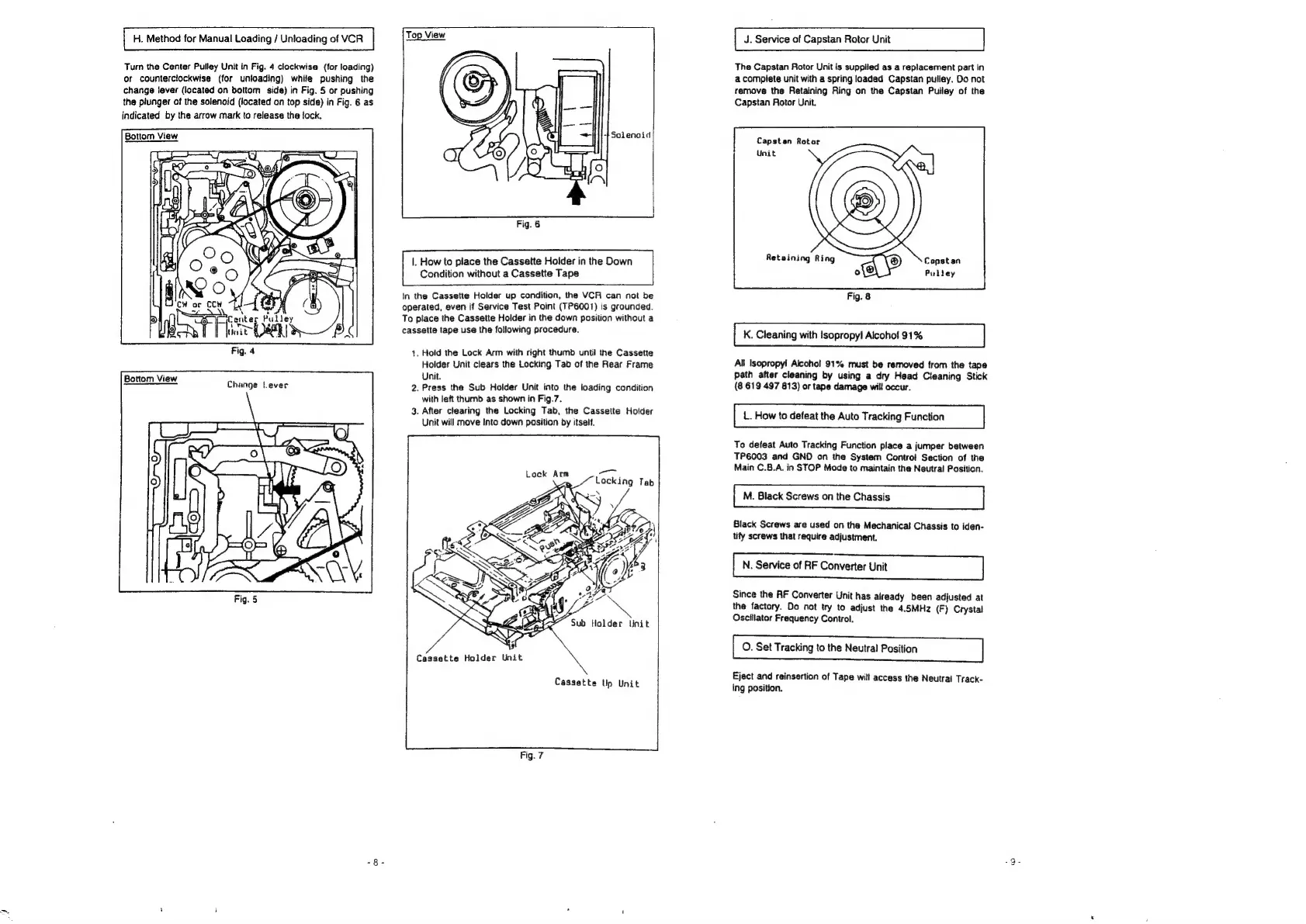
H.
Method
for
Manual
Loading
/
Unloading
of
VCR
Turn
the
Center
Pulley
Unit
in
Fig.
4
clockwise
(for
loading)
or
counterclockwise
(for
unloading)
while
pushing
the
change
lever
(located
on
bottom
side)
in
Fig.
§
or
pushing
the
piunger
of
the
solenoid
(located
on
top
side)
in
Fig.
6
as
indicated
by
the
arrow
mark
to
release
the
lock.
Bottom
View
ee
‘
.
\
S
Center
Pulley
b
|
Pitan
3
Fig.
4
Bottom
View
Change
t-ever
Fig.
6
|.
How
to
place
the
Cassette
Holder
in
the
Down
Condition
without
a
Cassette
Tape
In
the
Cassette
Holder
up
condition,
the
VCR
can
not
be
operated,
even
if
Service
Test
Point
(TP6001)
is
grounded.
To
place
the
Cassette
Holder
in
the
down
position
without
a
cassette
tape
use
the
following
procedure.
1.
Hold
the
Lock
Arm
with
right
thumb
until
the
Cassette
Holder
Unit
clears
the
Locking
Tab
of
the
Rear
Frame
Unit.
2.
Press
the
Sub
Holder
Unit
into
the
loading
condition
with
left
thumb
as
shown
in
Fig.7.
3.
After
clearing
the
Locking
Tab,
the
Cassette
Holder
Unit
will
move
Into
down
position
by
itself.
ee
Locking
Tab
\
Lock
Arm
Cassette
Holder
Unit
Cassette
Ulp
Unit
Fig.
7
J.
Service
of
Capstan
Rotor
Unit
The
Capstan
Rotor
Unit
is
supplied
as
a
replacement
part
In
a
complete
unit
with
a
spring
loaded
Capstan
pulley.
Do
not
remove
the
Retaining
Ring
on
the
Capstan
Pulley
of
the
Capstan
Rotor
Unit.
Capstan
Rotor
5
=
Retaining
Ring
\®)
Constan
Pulley
Fig.
8
K.
Cleaning
with
Isopropyl
Alcohol
91%
All
Isopropyl Alcohol
91%
must
be
removed
from
the
tape
path
after
cleaning
by
using
a
dry
Head
Cleaning
Stick
(8
619
497
813)
or
tape
damage
will
occur.
L.
How
to
defeat
the
Auto
Tracking
Function
To
defeat
Auto
Tracking
Function
piace
a
jumper
between
TP6003
and
GND
on
the
System
Control
Section
of
the
Main
C.8.A.
in
STOP
Mode
to
maintain
the
Neutral
Position.
M.
Black
Screws
on
the
Chassis
Black
Screws
are
used
on
the
Mechanical
Chassis
to
iden-
tify
screws
that
require
adjustment.
N.
Service
of
RF
Converter
Unit
|
Since
the
RF
Converter
Unit
has
already
been
adjusted
at
the
factory.
Do
not
try
to
adjust
the
4.5MHz
(F)
Crystal
Oscillator
Frequency
Control.
O.
Set
Tracking
to
the
Neutral
Position
Eject
and
reinsertion
of
Tape
will
access
the
Neutral
Track-
Ing
position.
ire)

Related product manuals