
 Need help?
Do you have a question about the Blaupunkt Nashville DAB35 and is the answer not in the manual?
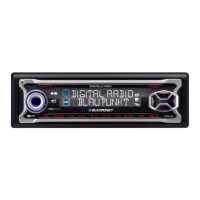
Controls the power state and volume mute function.
Button to open the detachable control panel.
Rotary knob to adjust audio volume.
Selects radio wavebands and memory banks.
Buttons for display content and menu interaction.
Arrow buttons for menu navigation and selection.
Activates traffic information standby.
Starts recording or deletes titles.
Buttons 1-5 for storing and recalling radio presets.
Adjusts audio settings like bass, treble, and equalizer.
Switches between audio sources like Radio, CD, MP3.
Button to eject the CD from the drive.
Slot for inserting SD/MMC cards or KeyCard.
Important safety advice for operating the car sound system.
Instructions for installing the car sound system.
Guidance on using Blaupunkt-approved accessories for installation.
Specifies the need for a special DAB antenna.
Information on compatible remote controls for basic functions.
Details on compatible Blaupunkt and Velocity amplifiers.
Information on connecting Blaupunkt CD changers.
How to activate or deactivate the device's demo mode.
Describes the automatic menu timeout function.
Details about the detachable control panel for theft protection.
Advice on preventing theft of the control panel.
Procedure for removing the detachable control panel.
Procedure for reattaching the control panel.
Explains the role of the keycard for device security.
Instructions for inserting the keycard into the device.
Instructions for removing the keycard from the device.
Information on acquiring a replacement keycard and master code.
Procedure for training a new keycard with the master code.
Tips for keeping the keycard contacts clean.
Device switches on/off with the vehicle ignition.
Detaching/attaching the control panel controls power.
Using the main button for power control.
How to adjust the audio volume using the rotary control.
Setting the default volume level when the device is switched on.
Quickly reducing the volume to a preset mute level.
How to cancel the mute function and restore volume.
Adjusting volume for phone calls or navigation announcements.
Setting the volume for system confirmation beeps.
Volume automatically adjusts based on vehicle speed.
Enjoy digital audio quality with DAB broadcasts.
Procedure to switch the device to DAB radio mode.
Enabling or disabling automatic news reports during broadcasts.
Enabling or disabling automatic weather reports during broadcasts.
Enabling or disabling automatic sports reports during broadcasts.
Controlling regional traffic announcements for relevant broadcasts.
Managing and selecting DAB programme memory banks.
Understanding and tuning into DAB programme ensembles.
Directly selecting previously received DAB ensembles.
Finding new DAB ensembles using seek tuning.
Manually tuning into DAB ensembles.
Selecting individual programmes within a DAB ensemble.
Briefly playing all receivable DAB programmes.
Initiating the DAB programme scan function.
Stopping the DAB scan and resuming listening.
Methods for storing favourite DAB programmes.
Manually assigning programmes to station buttons.
Using Travelstore to automatically store programmes.
Retrieving programmes stored in memory banks.
Selecting stations based on programme type (PTY).
Enabling or disabling the PTY selection feature.
Searching for stations matching a specific programme type.
Storing a selected programme type to a station button.
Configuring the DAB wavebands (Band III, L-Band).
Options for switching between DAB and FM reception.
Automatic tuning to better reception within ensembles.
Enabling or disabling the service following feature.
Information on programmes with multiple sub-channels.
Navigating and selecting available sub-programmes.
Displaying additional text information from DAB stations.
Setting the display format for programme names.
Choosing different display modes for DAB information.
Introduction to the RDS radio receiver and its capabilities.
Procedure to switch the device to radio mode.
Using RDS features like AF and REGIONAL for better reception.
Enabling or disabling the REGIONAL function for radio.
Enabling or disabling the RDS function.
Selecting FM/MW/LW wavebands and memory banks.
Methods for tuning into radio stations.
Automatic tuning to the next receivable station.
Manually tuning into radio stations.
Browsing through different programmes on an FM station.
Adjusting sensitivity for station seek tuning.
Methods for storing favourite radio stations.
Manually saving stations to memory.
Using Travelstore to automatically save stations.
Accessing and listening to saved radio stations.
Briefly playing all receivable radio stations.
Initiating the station scan function.
Stopping the station scan and resuming listening.
Configuring the duration for station scanning.
Selecting stations by programme type (PTY).
General use of the PTY function for station selection.
Automatic station switching based on programme type.
Enabling or disabling the PTY selection feature.
Searching for stations matching a specific programme type.
Storing a selected programme type to a station button.
Improving radio reception quality.
Reducing treble to minimize interference.
Enabling or disabling the HICUT function.
Function to avoid interference from nearby stations.
Enabling or disabling the SHARX function.
Choosing different display modes for radio information.
Enabling or disabling the display of radio text.
How the system handles traffic announcements (TA).
Using DAB or FM for traffic information.
Setting priority for traffic announcements over other audio.
Adjusting the volume for traffic announcements.
Using the device to play audio CDs and MP3 CDs.
Procedure to switch the device to CD playback mode.
Navigating and selecting tracks on an audio CD.
Quickly selecting tracks forwards or backwards.
Fast searching through tracks with audible feedback.
Playing tracks in a random order.
Disabling the random playback mode.
Briefly playing all tracks on the CD.
Stopping the track scan and resuming playback.
Setting tracks or entire CDs to repeat.
Disabling the track or CD repeat function.
Selecting different display modes for CD information.
Showing CD text or CD names on the display.
Enabling or disabling the display of CD text.
Displaying CD text as scrolling text.
Assigning custom names to CDs.
Procedure for naming or editing CD names.
Removing a name assigned to a specific CD.
Clearing all custom CD names.
Using the system to play MP3 music files.
Guidelines for creating and burning MP3 CDs.
Naming directories on MP3 CDs for organization.
Procedure to switch the device to MP3 playback mode.
Setting up how MP3 information is displayed.
Choosing default display types for MP3 tracks.
Navigating through directories on an MP3 CD.
Using browse mode for convenient MP3 file selection.
Navigating and selecting MP3 tracks.
Using arrow buttons to select MP3 files.
Selecting MP3 tracks while in browse mode.
Quickly searching through MP3 tracks.
Playing MP3 tracks in a random order.
Disabling the random playback for MP3s.
Briefly playing all MP3 tracks on the CD.
Stopping the MP3 scan and resuming playback.
Setting MP3 tracks or directories to repeat.
Disabling the MP3 repeat function.
Choosing to display MP3 ID-TAG information.
Displaying MP3 information as scrolling text.
Programming favourite MP3 tracks using TPM.
Step-by-step guide to programming favourite tracks.
Enabling or disabling the Favourite Track Programming.
Playing files from SD/MMC cards.
Deleting individual MP3 tracks from favourite lists.
Deleting all stored tracks from the current CD.
Clearing all stored track lists from all CDs.
Procedure for safely removing an SD/MMC card.
Procedure for inserting an SD/MMC card.
Procedure to switch the device to SD/MMC playback mode.
Setting display options for SD/MMC playback.
Choosing default display types for SD/MMC files.
Navigating through directories on an SD/MMC card.
Using arrow buttons to select directories.
Navigating and selecting files on an SD/MMC card.
Using arrow buttons to select files.
Selecting files while in browse mode.
Quickly searching through SD/MMC files.
Playing SD/MMC files in a random order.
Disabling the random playback for SD/MMC.
Briefly playing all files on the SD/MMC card.
Stopping the SD/MMC scan and resuming playback.
Setting SD/MMC files or directories to repeat.
Disabling the SD/MMC repeat function.
Displaying SD/MMC information as scrolling text.
Recording DAB programmes directly onto SD/MMC cards.
Choosing to display MP3 ID-TAG information for SD/MMC.
Procedure for formatting SD/MMC cards for compatibility.
Notes on SD/MMC formatting and mode compatibility.
Deleting individual recorded files from an SD/MMC card.
Initiating the recording of DAB programmes onto SD/MMC.
Setting up timer-based recording of DAB programmes.
Enabling or disabling the timer-controlled recording function.
Configuring the start time and duration for recordings.
Listening to recorded files directly from the device.
Playing recordings on PCs or other compatible players.
General information about operating the CD changer.
Procedure to switch the device to CD changer mode.
Navigating between different CDs in the changer.
Navigating and selecting tracks from a CD in the changer.
Fast searching through tracks with audible feedback.
Selecting display modes for CD changer information.
Setting CD tracks or entire CDs to repeat.
Disabling the CD repeat function.
Playing CD changer tracks in a random order.
Disabling the random playback for CD changer.
Briefly playing all tracks on all CDs in the changer.
Stopping the CD changer scan and resuming playback.
Assigning custom names to CDs in the changer.
Procedure for naming or editing CD changer names.
Removing a name assigned to a specific CD in the changer.
Clearing all custom CD names from the changer.
Showing the current time on the display.
Setting the clock automatically via RDS signal.
Manually setting the clock time.
Displaying time when the device is off but ignition is on.
Switching between 12-hour and 24-hour clock formats.
Overview of adjustable sound settings.
Modifying the bass level for audio sources.
Modifying the treble level for audio sources.
Adjusting the left/right volume distribution (balance).
Adjusting the front/rear volume distribution (fader).
Enhancing bass at low volume levels.
Setting the level of X-BASS boost.
Features of the digital equalizer with presets.
Enabling or disabling the equalizer function.
Procedure to turn off the equalizer.
Choosing pre-defined sound profiles (e.g., POP, ROCK).
Choosing optimized EQ settings for different vehicle types.
Manually configuring equalizer bands and frequencies.
Recommendations and notes for adjusting equalizer settings.
Steps for adjusting equalizer bands and gain.
Guidance on adjusting sound impression using the equalizer.
Setting the brightness level for the display.
Setting the display's viewing angle for optimal visibility.
Connecting external audio devices like MP3 players.
Enabling or disabling the AUX input for external sources.
Information on connecting external amplifiers.
Turning the device's internal amplifier on or off.
Using TMC for dynamic navigation system traffic information.
Technical details of the amplifier output.
Specifications for the FM, MW, LW tuners.
Technical details for DAB reception bands.
Technical specifications for CD playback.
 General
| Brand | Blaupunkt |
|---|---|
| Model | Nashville DAB35 |
| Category | Car Receiver |
| Language | English |




 To Next Page
