Introducon and Overview
2.1 Connecons
PowerZone™ Connect signal input and output connecons are
accomplished via RCA Phono and Euroblock style connectors.
A GPIO (General Purpose In/Out) Euroblock connector enables
some amplier funcons to be controlled, and wireless or RJ45
socket Ethernet network connecon opons are also provided.
PowerZone™ Connect ampliers have no mains power switch
and are operaonal as soon as mains power is connected via the
IEC 60320 mains socket.
2.2 Network Features
PowerZone™ Control
PowerZone™ Connect ampliers are TCP/IP network
connected devices that require a wired or wireless network
connecon to access their conguraon menus. The
conguraon menus are accessed via the PowerZone™Control
Web App interface and cover Input, Zone, Output and General
Sengs funcons. The conguraon menus are fully described
in Secon 4 of this manual.
Audinate Dante
®
PowerZone™ Connect ampliers are oponally compable
with Audinate Dante
®
audio over IP (AoIP) networks and
installaons.
Dante
®
equipped versions of PowerZone™ Connect ampliers
enable the transmission and receipt of digital audio over
an Ethernet network using the IP based Dante
®
protocol.
Conguraon and management of the IP roung for Dante
®
digital audio, including the seng of network parameters
such as IP addresses and subnet masks, is administered by
Audinate’s Dante
®
Controller soware applicaon. Dante
®
Controller downloads and comprehensive guidance on the
conguraon and installaon of Dante
®
based audio over IP
can be found at: www.audinate.com/products/soware/dante-
controller.
2.3 External Device Remote Control
PowerZone™ Connect ampliers are able to be controlled
remotely using the Blaze Wall-S1 control panel. The Wall-S1
is an Ethernet connected wall-mounted device able to
control Blaze PowerZone™ Connect amplier volume and
input source selecon. The Wall-S1 is powered via a POE
(Power Over Ethernet) wired connecon to an appropriately
specied network switch. A single Wall-S1 device can control
one amplier zone only, so remote control of mulple zones
requires mulple Wall-S1 devices – each one assigned to an
individual zone.
Full informaon on Wall-S1 installaon and use can be found
in the Wall-S1 installaon manual available for download from:
hps://blaze-audio.com/products/control/wall-s1/
2.4 Dimensions
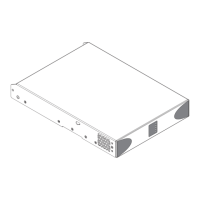
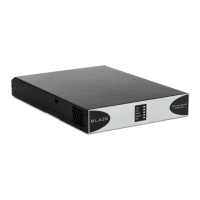
PowerZone™ Connect amplier dimensions and features are
illustrated in Diagrams 1a and 1b. The ampliers are primarily
intended for installaon in an equipment rack but can also
be under-desk or wall mounted, or used free standing. They
are fan-cooled and must be installed such that venlaon
apertures are not obstructed.
2.5 Firmware
This manual describes the features, funcons and user
interface of PowerZone™ Connect ampliers running Firmware
Version 1.5.0.
It is strongly recommended that the rmware version
installed in the amplier in use is checked inially, and
regularly thereaer. If updated rmware is available,
the amplier should be updated as a priority.
The rmware installed in the amplier can be idened and
updated by selecng the Device opon in the PowerZone™
Control web app Sengs Menu. Firmware versions can be
checked, and rmware downloaded, from the Blaze website:
hps://blaze-audio.com/support/#Firmware.
3. Carton Contents
PowerZone™ Connect ampliers are shipped in a cardboard
carton containing the amplier unit, a mains cable appropriate
for the sales territory, an accessory pack, and a document pack.
The full contents is listed below.
• Amplier unit
• Mains power cable
• Input connector x 2
• GPIO socket connector
• Output connector x 1 or 2
• Adhesive rubber feet x 4
• Document pack


 To Next Page
 Loading...