Installaon
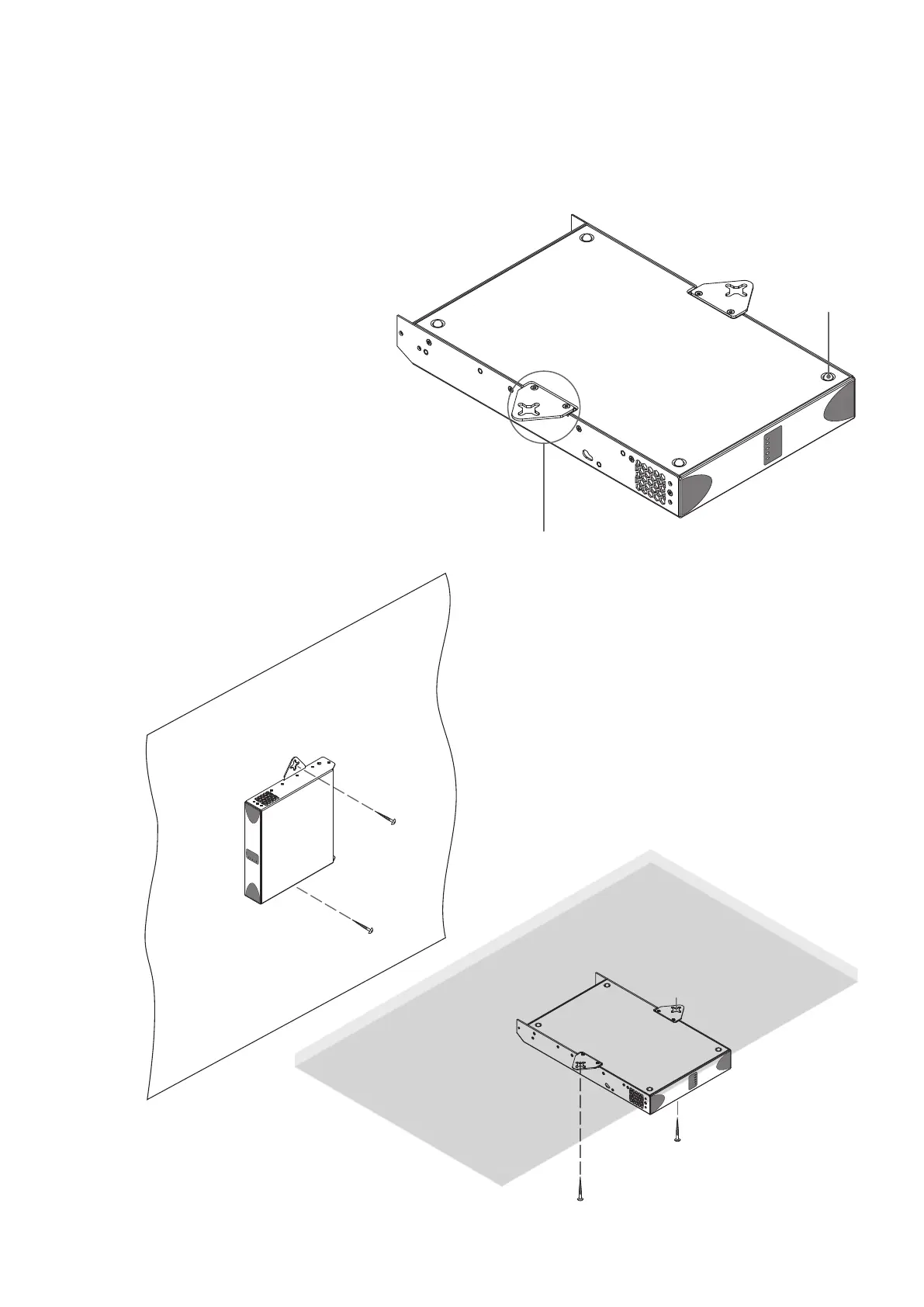
Diagram 4a
PowerZone™ Connect
with desk/wall Mounng Plate and adhesive feet.
2 posions and 4 posions.
Diagram 4b
PowerZone™ Connect
wall and under-desk mount.
4.2 Free-standing
If not installed in an equipment rack, PowerZone™ Connect
ampliers can be placed free-standing on a at surface.
Adhesive rubber feet are supplied for this purpose.
PowerZone™ Connect ampliers can also be
aached to the underside of desks or wall
mounted using connecng plate hardware. The
adhesive rubber feet should also be used in these
circumstances to minimise the possibility of
vibraon between the amplier and mounng
surface. Wall and desk mounng is illustrated in
Diagrams 4a and 4b.
It is important in any free standing installaon that
airow through the amplier’s side panel mounted
fans and rear panel venlaon apertures is not
compromised by adjacent items. At least 80mm of
free space behind the amplier and 25mm along at
least one side should be retained at all mes.
Mounng Plate +
2 x M3 x 6 countersunk
Adhesive Foot
4 posions


 To Next Page