Installaon
4. Installaon
Note: The rack mounng and desk/wall mounng components
described and illustrated in Secons 4.1 to 4.3 are not supplied
with PowerZone™ Connect ampliers but are available to purchase
as accessories. Contact your amplier re-seller for more informaon.
4.1 PowerZone™ Connect Mounng
The PowerZone™ Connect ampliers are shipped without
rack mount hardware aached but can be congured for rack
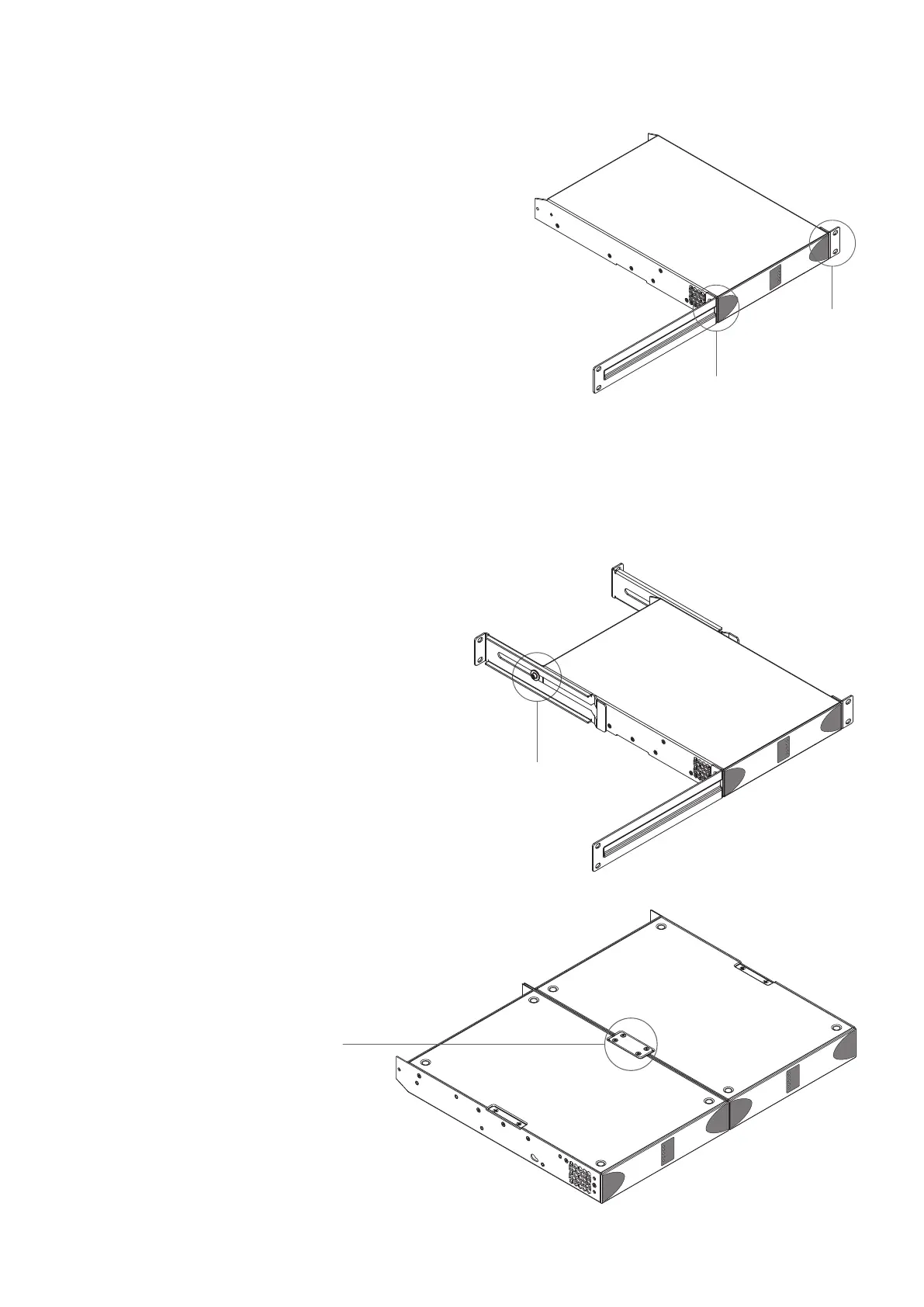
installaon using one standard rack ‘ear’ and one half-rack
extension piece as illustrated in Diagram 3a. The installaon
and equipment rack should be congured to provide
appropriate venlaon airow space around the sides and
rear of the amplier as illustrated in as illustrated in Diagram
1a. Venlaon airow space of at least 25 mm (1 in) should
be maintained along at least one side of the amplier at all
mes. Venlaon apertures are also located on the rear panel
of the amplier and must not be obstructed. It is important to
retain at least 80 mm (3.1 in) free space for airow behind the
amplier rear panel.
In addion to rack mount ears, oponal rack mount rear
support hardware is available and can be aached to the
amplier. Rear support hardware may be appropriate if
the amplier is to be used in a mobile rack or potenally be
subject to signicant movement. Diagram 3b illustrates the
use of rack mount rear support hardware.
Mulple PowerZone™ Connect ampliers can also be
mechanically connected using accessory connecng plates.
Diagram 3c illustrates the use of connecng plates.
Diagram 3a
PowerZone™ Connect
Rack Ear + Half-rack Extension.
Diagram 3b
PowerZone™ Connect
Rack Support hardware. 2 posions.
Rack Ear +
2 x M4 x 8
countersunk
Half-rack Extension +
2 x M4 x 8 countersunk
Rear Support + Buon +
1 x M4 x 8
Connecon Plate +
4 x M3 x 6 countersunk
Diagram 3c
2 x PowerZone™ Connect with Connecon
Plate. 2 posions


 To Next Page