Technical Manual
3-10
Range/Alternatives Explanation and
<default value> result of alternatives.
Display Mode
1 Scale
2 Scales
4 Scales
1 & 2 Scales
1 & 4 Scales
2 & 4 Scales
1 & 2 & 4 Scales
<1 & 2 & 4 Scales >
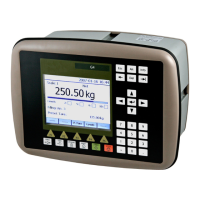
Defines the different weight display screens that can be
displayed on the graphical display.
1 Scale: Only the 1 Scale display is shown. Operator
can select which scale to display.
2 Scales: Only the 2 Scales display is shown. Operator
can select which scales (consecutive) to display.
4 Scales: Only the 4 Scales display is shown. Operator
can select which scales (consecutive) to display.
1 & 2 Scales: The operator can select between 1 and 2
Scales screens. Operator can select also which scale(s)
to display.
1 & 4 Scales: The operator can select between 1 and 4
Scales screens. Operator can select also which scale(s)
to display.
2 & 4 Scales: The operator can select between 2 and 4
Scales screens. Operator can select also which scale(s)
to display.
1 & 2 & 4 Scales: The operator can select between all
three different weight display screens. Operator can
select also which scale(s) to display.
Info Line 1 Mode
Not in use
Acc. Weight
Preset Tare
Scale Name
Batching Status
< Batching Status >
Defines the mode of the first information line on
the 1 scale screen on the graphical display.
Not in use: Info line 1 is not used.
Acc. Weight: The accumulated weight for the shown
scale is presented on the first info. line.
Preset Tare: The preset tare of the shown scale is
presented on the first info. line.
Scale Name:
under Scale x Parameters menu of the shown scale is
presented on the first info. line.
Batching Status: The batching status for the shown
scale is presented on the first info. line.
Info Line 2 Mode
Not in use
Acc. Weight
Preset Tare
Scale Name
Batching Status
< Not in use >
Defines the mode of the second information line on
the 1 scale screen on the graphical display.
See parameter ‘Info Line 1 Mode’ for details


 To Next Page