6. HOW TO START A MANUAL DEFROST.
Assure that none cycle is active or the hold mode is running.
Hold press the UP key fro few seconds.
NOTE: The defrost will not be done if the temperature detected
by the evaporator probe is higher than EdF (stop defrost
temperature) parameter.
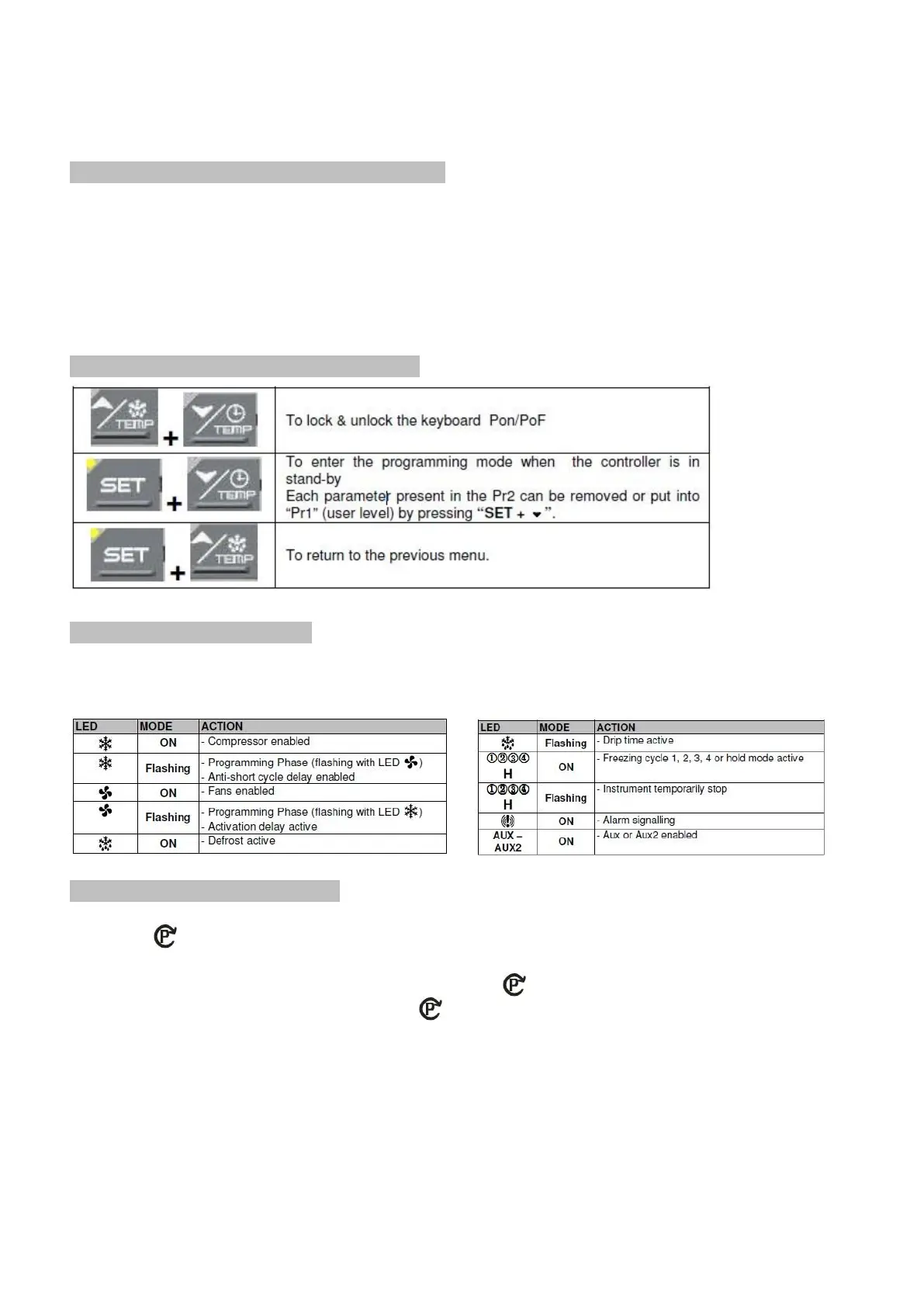
7. OTHER FUNCTIONS OF KEYBOARD
8. MEANING OF THE LEDS’
A series of light points on the front panels is used to monitor the loads controlled by the instrument.
Each LED function is described in the following table.
9. HOW TO SELECT A CYCLE
1. Push the to move among the cycles C1, C2, C3, C4 and the holding cycle. The related symbol on the
display will be lighted and the cycle will be selected.
NOTE: to pass from a cycle to another one simply push the key when the controller is in stand –by mode.
HOLD PHASE: To select H symbol pushing the .
Cycles are pre-set with the following values:
1. Cy1: for fast chilling and conservation of foods (hard +soft chill).
2. Cy2: for chilling and fast freezing of foods (hard +soft + freezing cycle).
3. Cy3: for direct fast freezing (only fast freezing cycle)
4. Cy4: for fast freezing avoiding ice skin (hard chill + freezing cycle)
5. HLd: hold mode function


 To Next Page