22 23
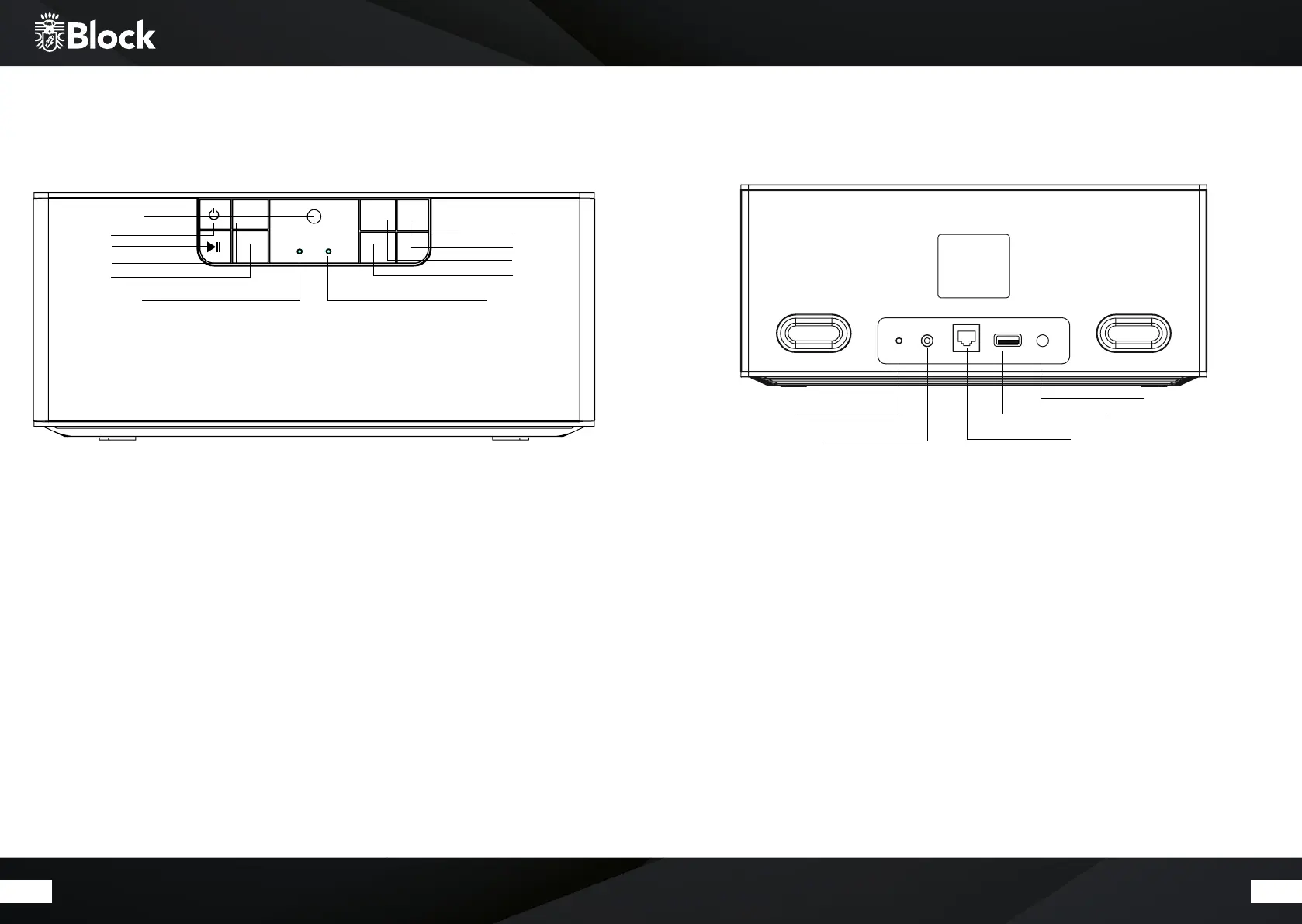
1. Infrared sensor for remote control.
2. ON / OFF“ button: press this button to switch the device on or to switch the device to standby.
A long press on the „ON / OFF“ button places the device in standby mode without a network connection.
In this case, the device can only be switched on again with the „ON / OFF“ button on the device.
3. „Play / Pause“ button: aer a single press, the device pauses, aer another Press the reproduction will continue.
4. Volume + button: press this button to raise the volume of the playback.
5. Volume - button: press this button to decrease the volume of the playback.
6. Indicator LED light: during set up it blinks white, it’s white during operation and red in standby mode.
7. Blue Indicator LED light: blinks when there is no network connection. It shines constantly when there is
network connection.
8. „Station key 1“ button: by pressing this key, a station can be saved and recalled. Hold the transmitter down
for a while to save it.
9. „Station key 2“ button: by pressing this key, a station can be stored and recalled.
10. „Station key 3“ button: by pressing this key, a station can be saved and recalled.
11. „Mode / Spotify“ button: by pressing this button you can switch between the playback modes.
Operating elements on the unit
1. LAN connector for RJ-45 connector (Ethernet)
2. AUX input: to connect external audio sources
3. USB input: to connect a USB stick
4. Power supply for the supplied external power adapter. The power cord must not be damaged or defective,
use only the supplied AC adapter..
5. Reset: to reset to factory settings
Connections on the device
5
4
3
12
VOL +
1
3
MODE /
SPOTIFY
2
VOL -
1
2
4
5
3
6
10
8
9
7
11


 To Next Page