38
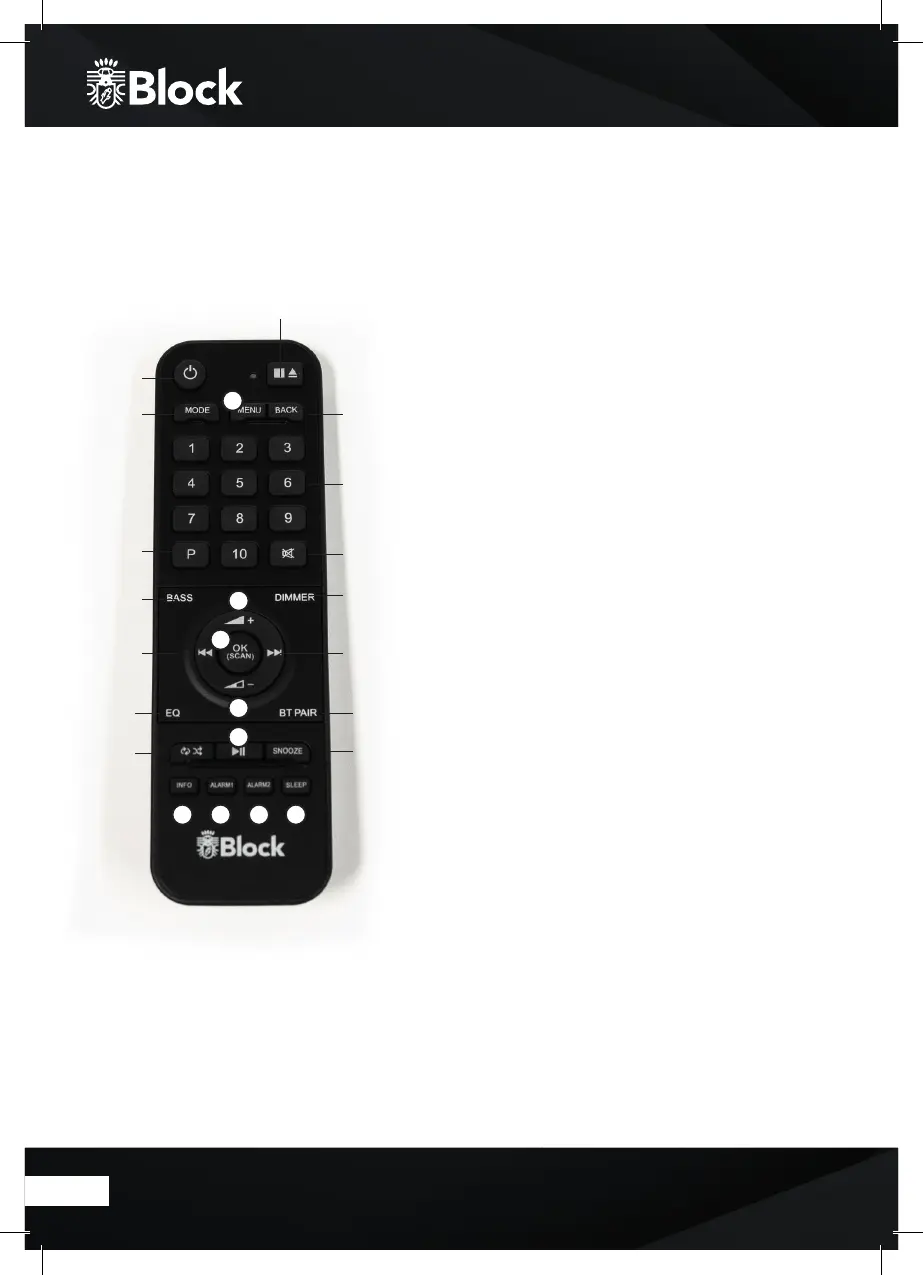
Remote control
1. „Standby“ button: Switches the device to „Clock“ mode, the display
will show the time and the date. Alarm: deaktivate the alarm.
2. „Mute“ button: Switches the sound o.
3. „CD/eject“ button: 1: Stops the CD. 2: Ejects the CD.
4. „Mode“ button: By pressing, the display switches to the overview
mode. You can now use the multifunction knob or the arrow keys on
the remote control to select the music source
5. Button „Menu: One or more short presses will show
additional
information about the music source (if there are any) on
the display. A long press calls up the menu of the device.
6. „Back“ button: In the menu navigation you will return to the
previous overview.
7.
„Back“ button: On radio mode, the device searches the previous
higher
radio station.
8.
„Forward“ button: On radio mode, the device searches the next higher
radio station.
9. Button „1 - 10“: On radio mode, recalls on the saved radio station
10. „P“ button: Recalls or saves pre-set radio station in radio mode
11. „Bass“ button: Turn the subwoofer on or o.
12. „Dimmer“ button: Adjust brightness.
13. „Volume +“ button: Increases the volume
14. „Volume -“ button: Ieduces the volume
15. „OK“ button: Press to select
16. “Play/Pause” button
17. „EQ“ button: Select between dierent equalizers.
18. „BT“ button: Connect a Bluetooth device.
19. „repeat/shule“ button: 1x: Repeats the track. 2x: Repeats all tracks.
3x: Shule mode. 4x: Stops the mode.
20. „Snooze“ button: Extend the timer for 5 min.
21. „Info“ button: Shule between the shown informations.
22. „Alarm1“ button: Adjust the alarm.
23. „Alarm2“ button: Adjust the alarm.
24. „Sleep“ button: Standby mode aer the choosen time.
1
4
10
11
7
17
19
6
9
2
12
8
18
20
3
5
13
14
16
21 22 23 24
15



 To Next Page