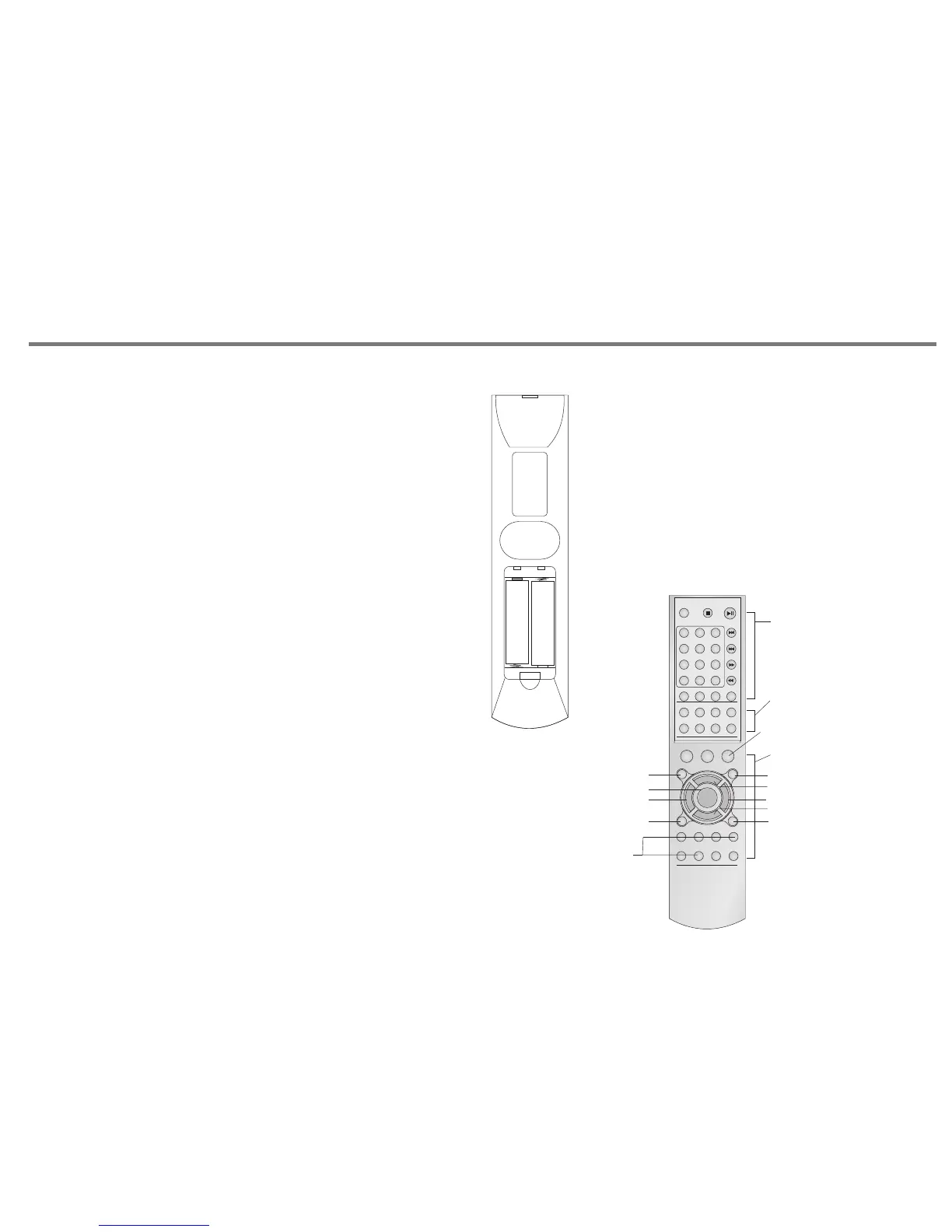
BATTERY INSTALLATION
By using the provided remote control unit the V 100 can be
controlled from your listening position. To use the remote
control unit, point it at the REMOTE SENSOR window of the
receiver.
Notes:
-Even if the remote control unit is operated within the
effective range, remote control operation may be impossible if
there are any obstacles between the unit and the remote
control.
-If the remote control unit is operated near other appliance
which generate infrared rays, or if other remote control
devices using infrared rays are used near the unit, it may
operate incorrectly.
Precautions concerning batteries
-Be sure to insert the batteries with correct positive+ and
negative - polarities.
-Use batteries of the same type. Never use different types of
batteries together.
- Rechargeable and non-rechargeable batteries can be used.
Refer to the precautions on their labels.
-When the remote control unit is not to be used for a long
time(more than a month), remove the batteries from the
remote control unit to prevent them from leaking. If the leak,
wipe away the liquid inside the battery compartment and
replace the batteries with new ones.
-Do not heat or disassemble batteries and never dispose of
old batteries by throwing them in a fire.
REMOTE CONTROL OPERATION RANGE
Use the remote control unit within a range of about 7
meters and the angles of up to 30 degrees aiming at
the remote sensor.
1. Remove the battery compartment cover.
2. Insert two "AA" dry batteries.
Make sure that the batteries are inserted with their
positive "+" and negative "-" poles positioned correctly.
3. Close the cover until it clicks.
If the distance required between the remote control unit and
main unit decreases, the batteries are exhausted. In this case,
replace the batteries with new one.
REMOTE CONTROL
P15
STAND BY
1
2
3
4
5
6
7
8
9
0/10
ENTE R
REPE AT
PROG RAM
STAND BY
(CD) (TUN ER)
RAND OM
AM/F M
TUNE +
TUNE -
INFO
STR/ MONO AUTO
MEMO RY
STAND BY
DEFAU LT
MUT E
BASS +
BASS -
TREB +
TREB -
L R
TV TAPE
AUX TUNE R
CD PHON O
VOL +
VOL -
This part for CD player C 100
This part for
Tuner R 100
This part for Amplifier V 100
Press and hold for 2 seconds to setup
bass, treble, balance to "middle" position
Treble level up +
Treble level down -
Volume level up +
Volume level down -
Balance, move to right channelBalance, move to left channel
Bass level up +
Bass level down-
Mute
INPUT SOURCE SELECT:
PHONO
CD
TUNER
AUX
TAPE
TV
A A
A A
+
-
+
-


 To Next Page