31 / EN
Fully Automatic Coffee Machine / User Manual
5. Fill the water tank once again until "descale level" with water, and press
the button once again to start the second cycle of descaling. If the
water tank is removed and placed back, the appliance will detect this
action and automatically start the second cycle (without pressing
again).
6. Once the water tank is emptied, the screen will go back to idle condition.
Descaling is completed. Fill the water tank with fresh water to start
preparing coffee.
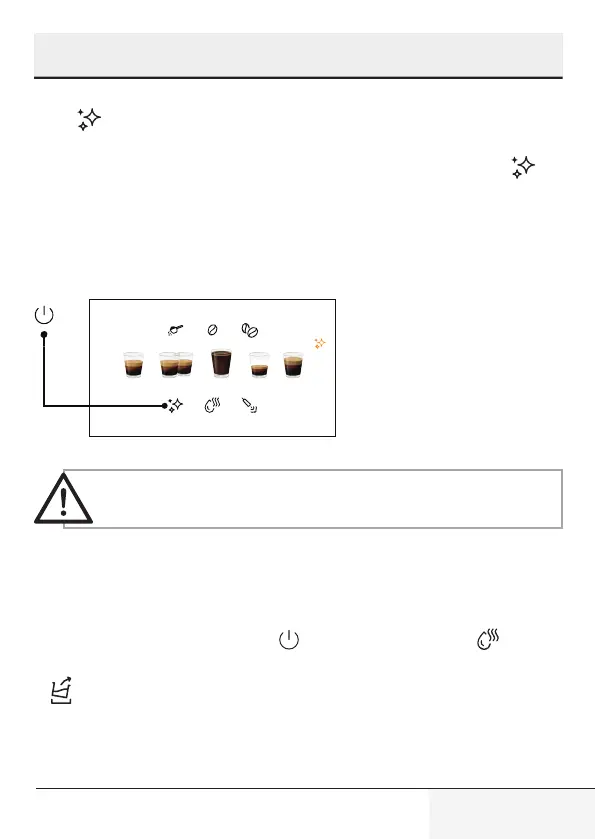
To reset descale
warning status;
In order to reset descale
warning status;
• Press power on/off
button and descale button all
together for 3 seconds.
Resetting descaling warning status is not suggested for
maintaining the best condition of the appliance.
6.3 Empty System Function
Use the empty system function before a long period of non-use and for frost
protection.
1. When on idle, press and hold the and the hot water button together
for 3 seconds.
2. will then light up.
3. Remove the water tank from the appliance, process will start automatically.
4. When the empty system function is completed, the appliance will switch
off automatically.
6 Cleaning



 To Next Page