10 /37 EN
Refrigerator / User Manual
Installation
3.10 Water filter
(in some models)
Your refrigerator may be equipped with an external
or internal filter depending on the model. To fit the
water filter, follow the instructions below referring
to the figures supplied:
3.10.1 Attaching the internal
filter into the refrigerator
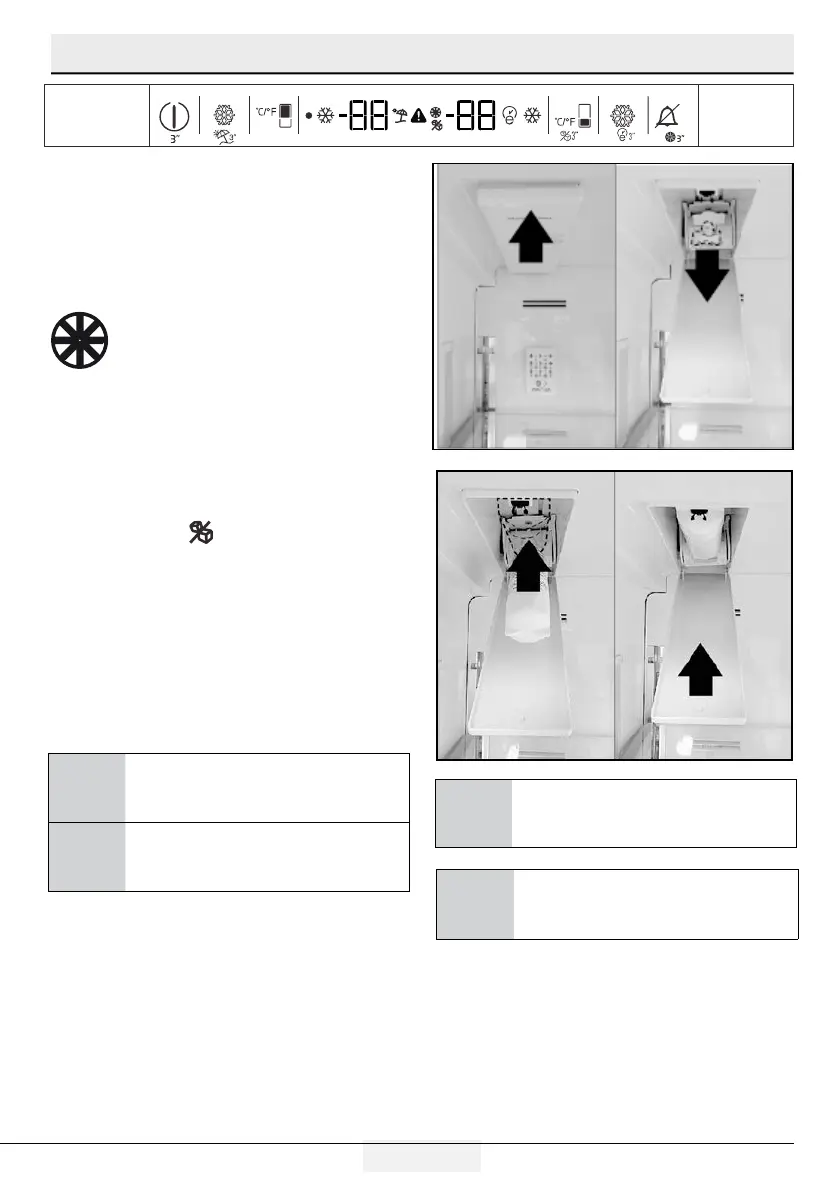
Filter replacement consists of 2 parts. These
are physically changing the filter and making
adjustments on the display.
1. Press “Ice Off”
button before removing the
by pass cover.
2.
Slide the water filter cover forward.
3.
Remove the water filter bypass plug by turning it
downwards.
4.
Seat the water filter cover into the mechanism and
push forwards to lock it in place.
5.
Press
“Ice Off”
button on the display again to exit
this mode.
A
WARNING: Ensure that the Ice Off mode
is enabled before removing the by-pass
cover.
C
It is normal that a few drops of water drip
after the cover has been removed.
Filter end of life warning.
A
WARNING: Water filter cleans some
foreign particles in the water. It does not
purify water from microorganisms.
C
Water filter must be replaced every 6
months. Make sure that the "Ice Off" mode
is enabled before removing the filter.



 To Next Page