22 /37 EN
Refrigerator / User Manual
Operating the product
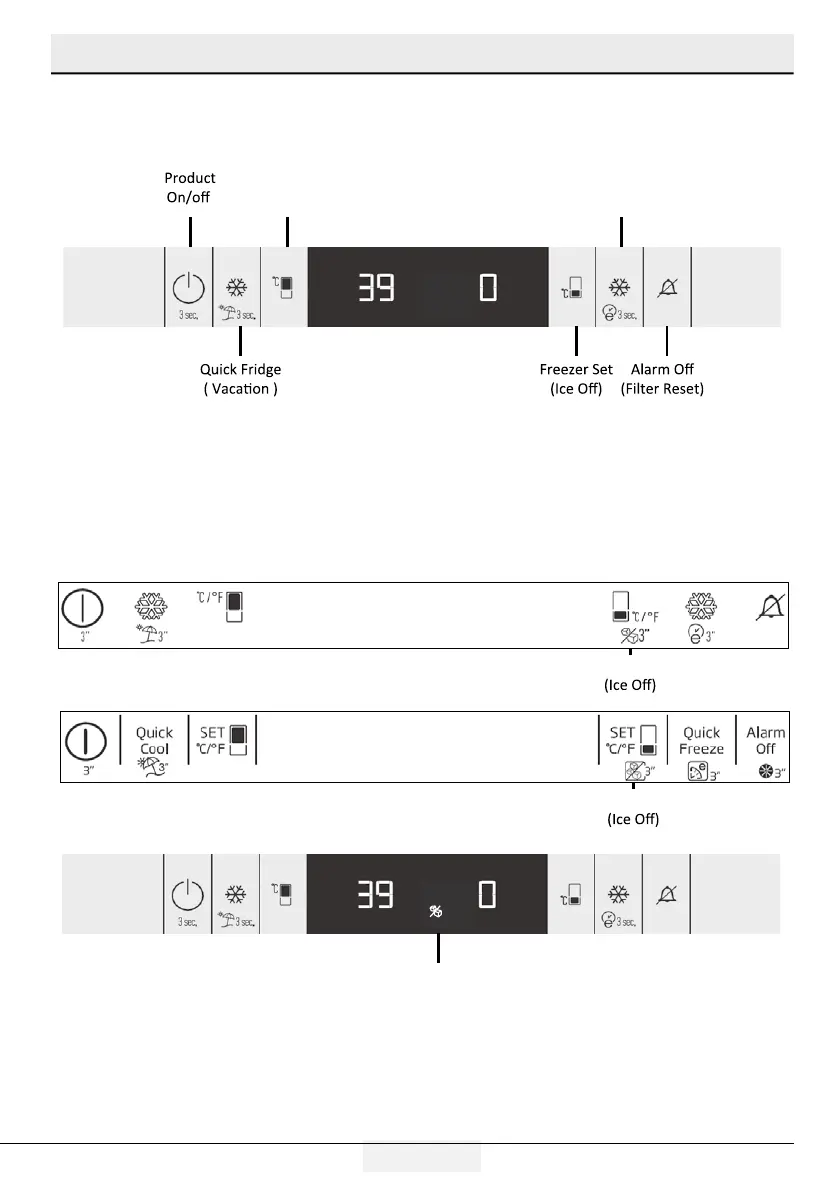
5.3 U4 Control Board 3D Display Activating/Deactivating Of Ice-Off Function
The display board we use in the refrigerator has a six-key system.
Set values are shown on the display.
*(pressing 3 sec.)
Step 1: Ice-off function is activated by pressing the Freezer Set button for 3 seconds at any time after it
is powered. The Ice-off icon turns on in the display and ice formation stops.
When the Freezer Set button is pressed for 3 seconds while the Ice-off icon is on, the Ice-off function is
deactivated.
The Ice-off icon goes out on the display and ice formation starts.
Freezer Set
Freezer Set
Quick Fridge
( Eco-Extra )
Fridge Set
Ice of icon



 To Next Page