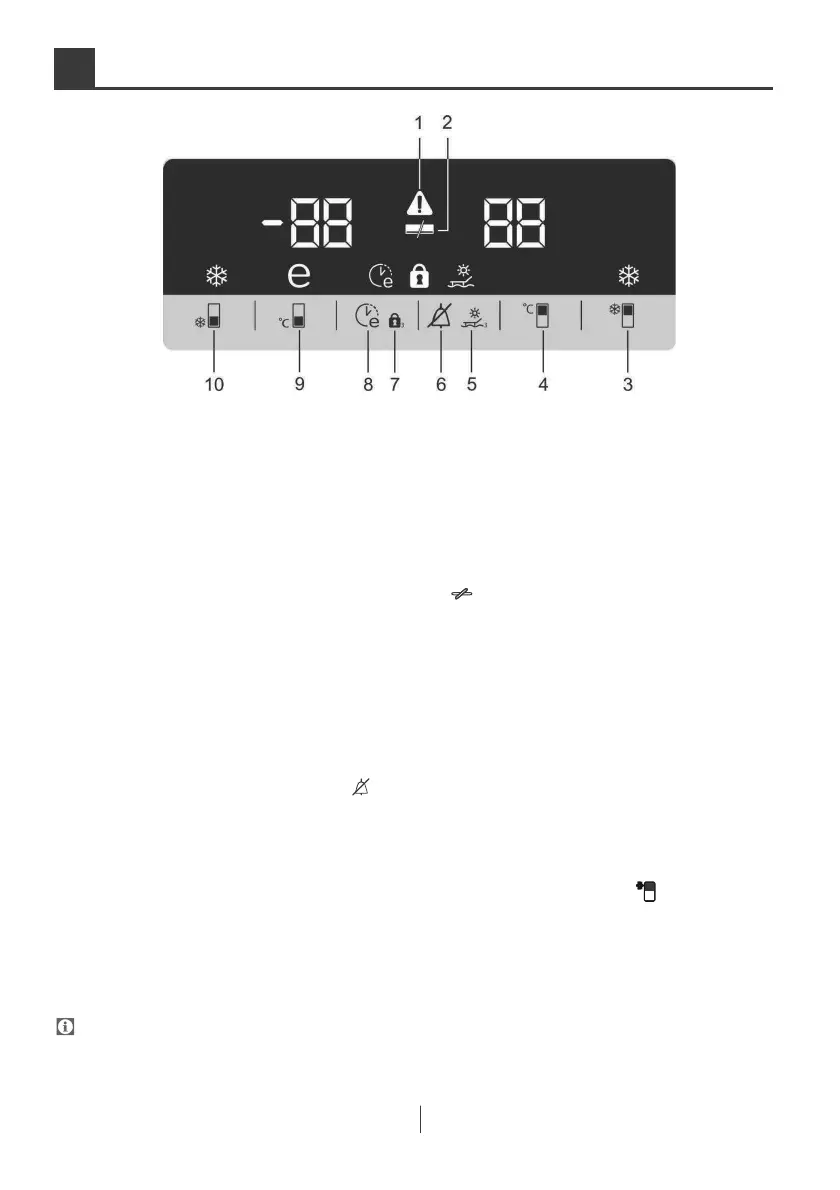
Indicator Panel
Indicator panel allows you to set the
temperature and control the other
functions related to the product without
opening the door of the product. Just
press the inscriptions on relevant buttons
for
function settings.
1. Power failure/High temperature /
error
warning indicator
!
) illuminates during power
failure, high temperature failures and
error warnings.
During sustained power failures, the
highest
temperature that the freezer
reaches w
ill flash on the
digital display. After checking the food
located in the freezer
compartment (
)
press the alarm off button to clear the
warning.
Please refer to "remedies advised for
troubleshooting" section on your manual
if you
observe that this indicator is
2. Energy saving function (display
off):
If the pr
oduct doors are kept closed for
a
long tim
e energy saving function is
automatically activated after 1 minu
te
and en
ergy saving symbol is illuminated.
(
)
When energy saving function is
acti
vated, all symbols on the display
other than energy saving symbol wi
ll turn
off.
When the Energy Saving functi
on is
acti
vated, if any button is pressed or th
e
door is
opened, energy saving func
tion
w
ill be
canceled and the symbols on
display will return to normal.
Energ
y saving function is activate
d
during
delivery from factory and ca
nnot
be canc
eled.
3.Quick fridge function
Press this button to activate or deactivate
the quick cool function
( )
*Optional: The figures in this user guide are intended as drafts and may not
perfectly match your product. If your product does not comprise the relevant parts, the
information pertains to
other models.



 To Next Page