27
Dryer / User manual
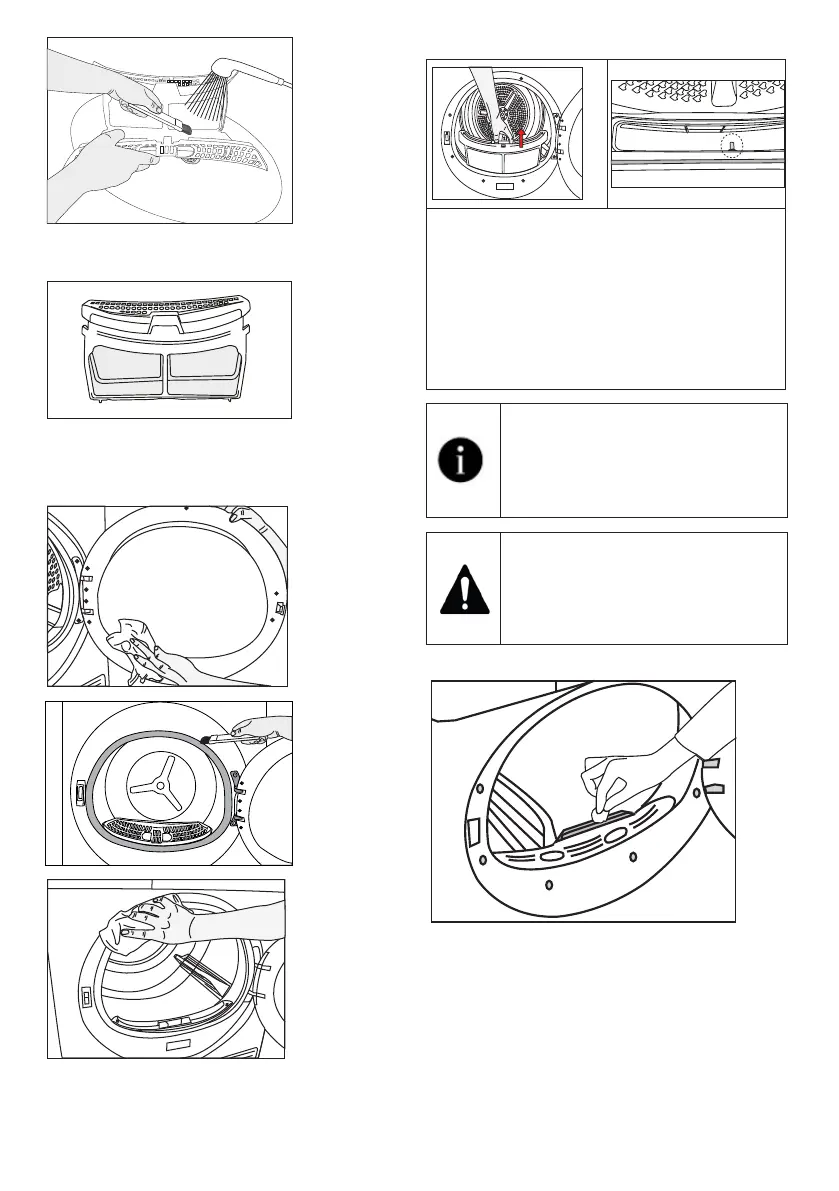
• Insert the lint filters on one another and
place it back in its place.
• Clean the inner surface of the loading door
and the gasket with a soft damp cloth or the
brush on the air deflector.
7.2 Cleaning the sensor
• There are temperature sensor in the
dryer that detect whether the laundry is
dry or not.
To clean the sensors:
• Open the loading door of the dryer.
• Remove the lint filter by pulling it up.
• Clean the sensor with your hand if any
fluff accumulation on it.
Clean the metal surfaces of the
sensor 4 times a year.
Do not use metal tools to clean the
sensors’ metal surfaces.
Due to fire and explosion hazard, do
not use solutions, cleaning materials
or similar tools to clean sensors.
7.3 Emptying the water tank
During drying, the moisture is removed from
the laundry and condensed, then the water is
accumulated in the water tank. Empty the water
tank after each drying session.



 To Next Page