Tumble Dryer Service Handbook
27
New Error Mode in the Service Test Mode
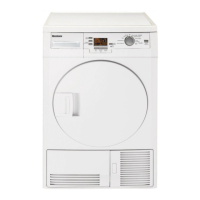
Step 1: In the Service Mode when the LCD shows Software version, for example: "u07".
Step 2: Turn the rotary to "Time" programme.
Step 3: Press the Start/Pause/Cancel button then you will be in the New error mode. Current
cycle information can be seen once before the error menu.
CC: Current Cycle, 34: Number of
cycle.



 To Next Page