EasyManua.ls Logo

Blue Moon Health Source POINTER EXCEL II - Key Features of the Device; Digital Display Chamber Features; Polarity Change-over Switch Functionality; Probe Treatment Capability

Blue Moon Health Source POINTER EXCEL II
20 pages
Print Icon
To Next Page IconTo Next Page
To Previous Page IconTo Previous Page
Loading...
Features......
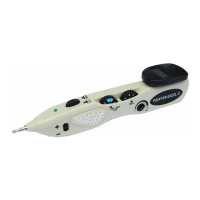
1) The
Digital
Display
chamber is located
on the rear top
side of the unit.
It features
a digital
display to show the
working
frequency
(from
I
1o
16 Hz)
of stimulation during
acupuncture
treatment
when pushing down
the
stimulation button.
and
a nurnerical display
(nraxinrunr
arourrd
500
when sensitivity
is
adjust to rhe
highest
range)
to
shorv the scnsitivity
of detection
during the
location of acupuncture
points.
When used
in Acupuncture
trr
trigger
point
detection,
the
digital
display
will
show the
location
of
the acupuncture
point in nunrerical fbrm.
During
acupuncture
location. the highest
numerical value refers
to
the
nearest
site of acupuncture point.
'lhe
green
indication
LED
will
light continuously
when
the acupuncture
point is located.
2) Polarity
change-over switch which allows
the output
stimulatiotr to
reverse its polaritv
of
stimulation from
*
(fbr
tonification)
to
lsedation)
or
vice
versa,
easily
durin,q
treatment.
When
doing this,
the
output
intensity should
be turned down
first in order to
avoid
a sudden increase in
intensity.
3) Acupuncture trealment
throu-qh the
probe mav
be used
tor the imrnediate
treatment
of the
point
or
area
righr after its detection on the
patient, by'
simply
pushing
down
the stimulation/detection
burton
on top
of
the unit.
The
button
on the top of the
unit may be
pressed
to
activate the
stimulation mode.
A continuous electric
pulse
of I to
16 Hz
(adjustable
by turning
the frequency
dial) is emitted through
the
probe,
the
intensity may also
be adjusted.
The
intensity
is
controlled
with the intensity knob
labeled
'INT".
1t)