8
CONTROL AND LED’S
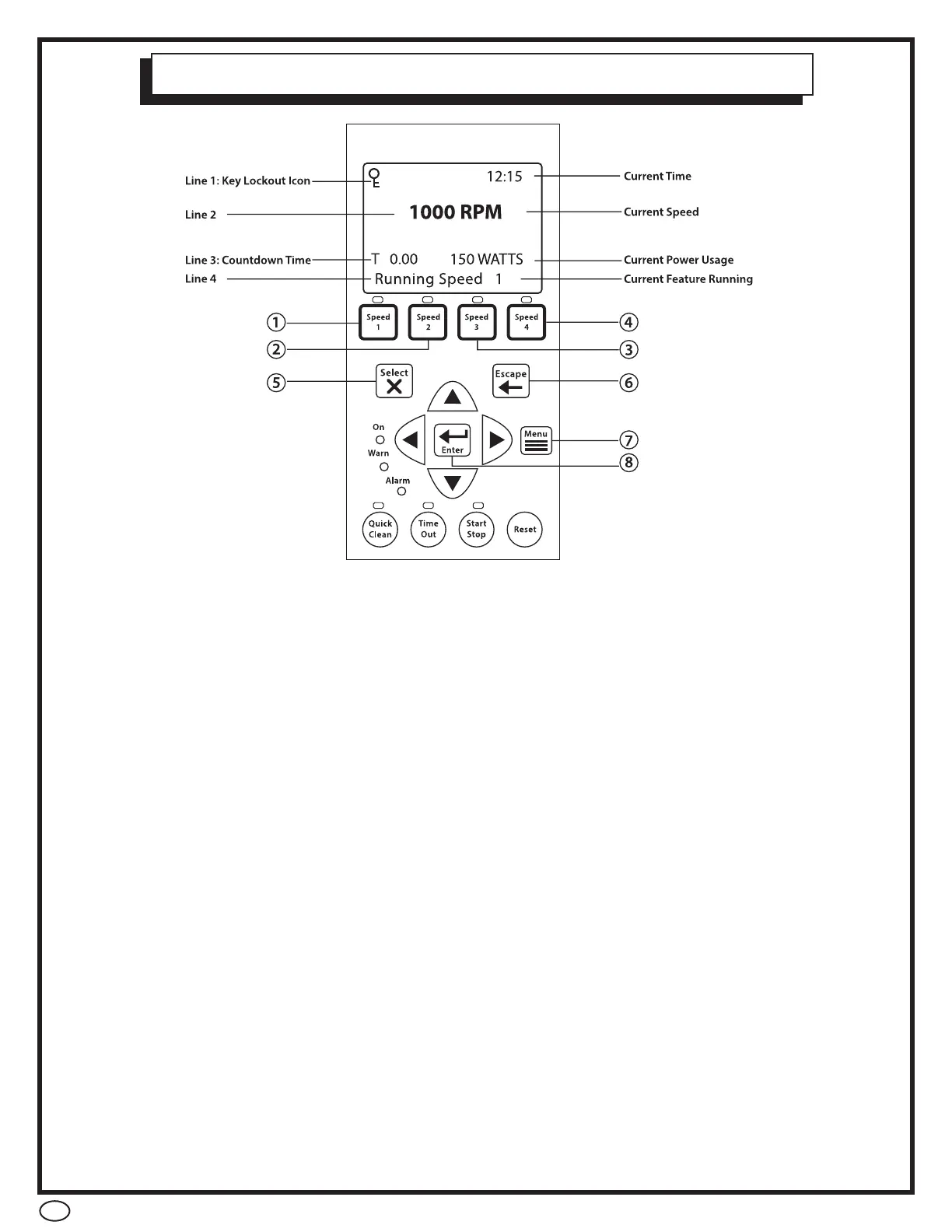
1. SPEED 1 BUTTON / LED – Press to select speed 1 ( 750 RPM) . The LED above
the button indicates Speed 1 is active
2. SPEED 2 BUTTON / LED – Press to select speed 2 ( 1500 RPM). The LED above
the button indicates Speed 2 is active.
3. SPEED 3 BUTTON /LED – Press to select speed 3 (2500 RPM). The LED above the
button indicates Speed 3 is active
4. SPEED 4 BUTTON / LED – Press to select speed 4 (3100 RPM). The LED above
the button indicates Speed 4 is active.
5. SELECT BUTTON – Displays available menu items or enters edit mode for changing
the value on line 2 of the display
6. ESCAPE BUTTON – Moves to next level up in the menu structure, and / or stops
editing the current setting.
7. MENU BUTTON – Accesses the pump menu if the pump is stopped
8. ENTER BUTTON – Saves the current menu item setting. Press this button to
acknowledge alarms and warning alerts.
9. ARROW BUTTONS:
• UP ARROW – Move up one level in the menu or to increase a digit when
changing a setting
• DOWN ARROW – Move one level down in the menu or to decrease a digit
when changing a setting.
• LEFT ARROW – Moves the cursor left one digit when changing a setting
• RIGHT ARROW – Moves the cursor right one digit when changing a setting


 To Next Page