10 11
Getting started
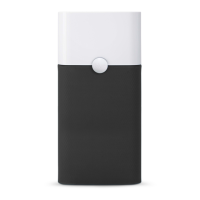
Plug in your Pure 221
air purifier.
Press the button to
turn the unit on. The
unit automatically
sets itself to the
recommended
energy-efficient
operating speed.
When the indicator
light glows white,
your unit is working
properly.
SET UP ON/OFF AND OPERATING SPEEDS
On/off and speed control
On/Low
Press once to turn
the unit on and set it
to the recommended
energy-efficient
speed.
Medium
Press twice to set to
medium speed.
High
Press three times to
set to high speed.
Off
Press a fourth time to
turn the unit off.
Moreover, Pure 221 has an Autostart feature.
This means that Pure 221 will automatically
restart at the set speed if a power failure
occurs, the unit is unplugged or a power
switch timer is used.
31
2
1
4
2 3

 To Next Page
 Loading...