12 13
FILTERS FILTERS
Button control functions
Reset the filter alert
Press the button for
three seconds to
reset the filter alert.
1 2 3
You can change the filter before the indicator light turns red, i.e. when
it first turns yellow. In this case, just reset the unit after changing the
filter and use for another 6 months. (see "Change the main filter")
Change filter
indicator
When the indicator
turns yellow (after 5
months of operation),
it’s time to order a
new filter.
Change filter
When the indicator
light turns red (after
1 extra month of
operation), you
should change the
main filter.
*Particle matter smaller than 2.5 microns
Particle filters remove:
Particle + Carbon filters remove all the above pollutants, plus:
Filters
General information:
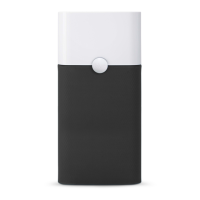
The unit is delivered with either a Particle filter or Particle + Carbon
filter. These filters remove the following pollutants:
IMPORTANT!
Use only genuine Blueair filters to ensure proper function of your
unit and to qualify for full warranty coverage.
DustPM2.5* Pollen Pet dander
Mold
SmokeVOC
Dust mites Bacteria
Cooking odorsChemicals

 To Next Page
 Loading...