EasyManua.ls Logo

Blueant X6 - Page 9

Blueant X6
11 pages
Print Icon
To Next Page IconTo Next Page
To Previous Page IconTo Previous Page
Loading...
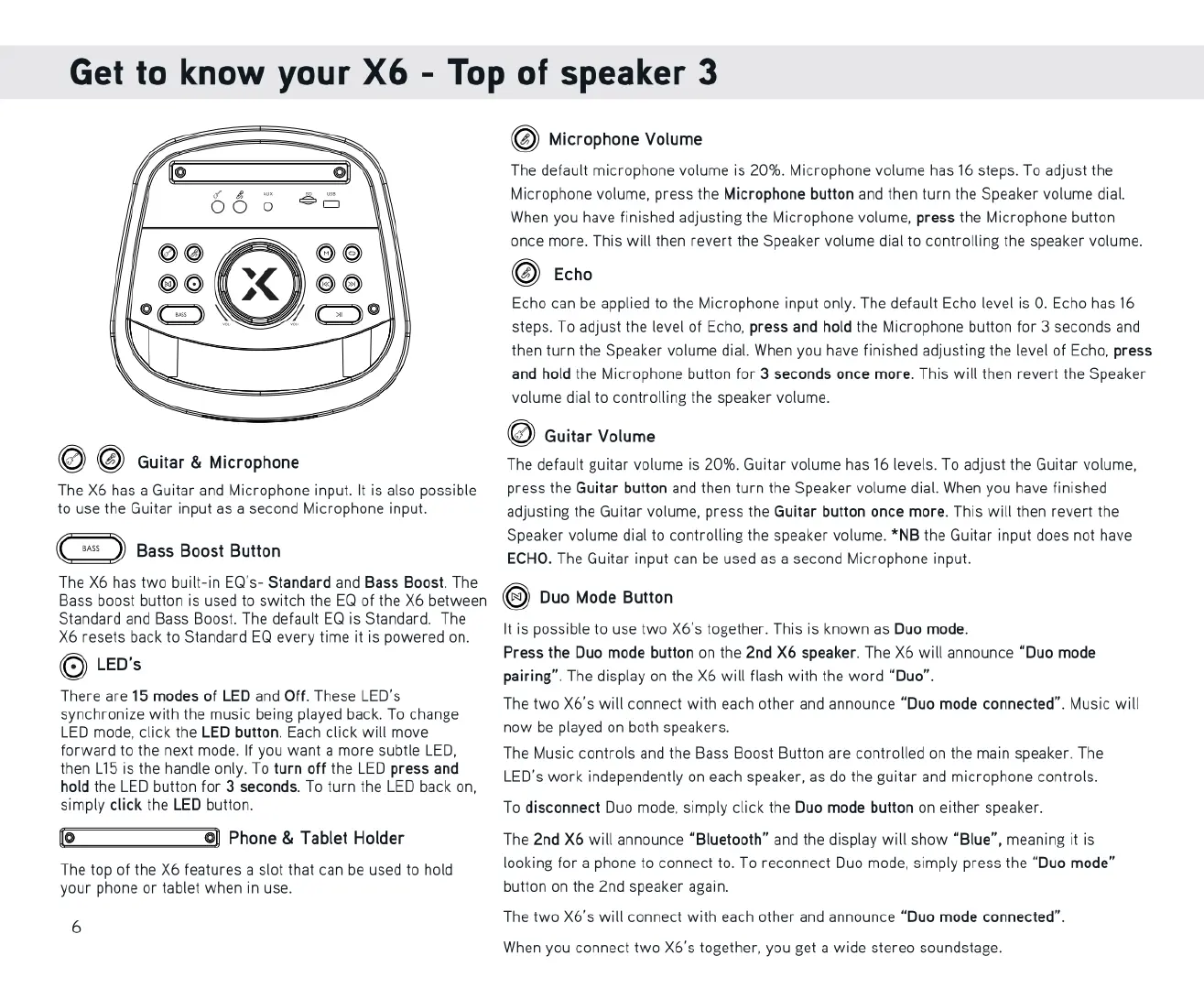
Get
to
know
your
X6
-
Top
of
speaker
3
Microphone
Volume
The
default
microphone
volume
is
20%.
Microphone
volume
has
16
steps.
To
adjust
the
Microphone
volume,
press
the
Microphone
button
and
then
turn
the
Speaker volume
dial.
When
you
have
finished
adjusting
the
Microphone
volume,
press
the
Microphone
button
once
more.
This
will
then
revert
the
Speaker volume
dial
to
controlling
the
speaker
volume.
Echo
Echo
can
be
applied
to
the
Microphone
input
only.
The
default
Echo
level
is
0.
Echo
has
16
steps.
To
adjust
the
level
of
Echo,
press
and
hold
the
Microphone
button
for
3
seconds
and
then
turn
the
Speaker volume
dial.
When
you
have
finished
adjusting
the
level
of
Echo,
press
and
hold
the
Microphone
button
for
3
seconds
once
more.
This
will
then
revert
the
Speaker
volume
dial
to
controlling
the
speaker
volume.
.
Guitar
Volume
Guitar
&
Microphone
The
default
guitar
volume
is
20%.
Guitar
volume
has
16
levels. To
adjust
the
Guitar
volume,
The
X6
has
a
Guitar
and
Microphone
input.
It
is
also
possible
press
the
Guitar button
and
then
turn
the
Speaker volume
dial.
When
you
have
finished
to
use
the
Guitar
input
as
a
second
Microphone
input.
adjusting
the
Guitar
volume,
press
the
Guitar
button
once
more.
This
will
then
revert
the
Speaker
volume
dial
to
controlling
the
speaker volume.
*NB
the
Guitar
input
does
not
have
ECHO.
The
Guitar
input
can
be
used
as
a
second
Microphone
input.
Bass
Boost
Button
The
X6
has
two
built-in
EQ's-
Standard
and
Bass
Boost.
The
Bass
boost
button
is
used
to
switch
the
EQ
of
the
X6
between
.
Duo
Mode
Button
Standard
and
Bass
Boost.
The
default
EQ
is
Standard.
The
It
ble
t
two
X6's together.
Th
K
D
d
X6
resets
back
to
Standard
EQ
every
time
it
is
powered
on.
is
possible
to
use
two
X6's
together.
This
is
known
as
Duo
mode.
LED'
Press
the
Duo
mode
button
on
the
2nd X6
speaker.
The
X6
will
announce
“Duo
mode
s
pairing”.
The
display
on
the
X6
will
flash
with
the
word
“Duo”.
There
are
15
modes
of
LED
and
Off.
These
LED's
synchronize
with
the
music
being played
back.
To
change
LED
mode,
click
the
LED
button.
Each
click
will
move
now
be
played
on
both
speakers.
forward
to
the
next
mode.
If
you
want
a
more
subtle
LED, The
Music
controls
and
the
Bass
Boost
Button
are
controlled
on
the
main
speaker.
The
then
L15
is
the
handle
only.
To
turn
off
the
LED
press
and
y f .
hold
the
LED
button
for
3
seconds.
To
turn
the
LED
back
on,
LED’s
work
independently
on
each
speaker,
as
do
the
guitar
and
microphone
controls.
simply
click
the
LED
button.
To
disconnect
Duo mode,
simply
click
the
Duo
mode
button
on
either
speaker.
The two
X6's
will
connect
with
each
other
and
announce
“Duo
mode
connected”.
Music
will
Phone
&
Tablet
Holder
The 2nd X6
will
announce
“Bluetooth”
and
the
display
will
show
“Blue”,
meaning
it
is
looking
for
a
phone
to
connect
to.
To
reconnect
Duo
mode,
simply
press
the
“Duo
mode”
The
top
of
the
X6
features
a
slot
that
can
be
used
to
hold
your
phone
or
tablet
when
in
use.
button
on
the
2nd
speaker
again.
6
The two
X6's
will
connect
with
each
other
and
announce
“Duo
mode
connected”.
When
you
connect
two
X6's
together,
you
get
a
wide
stereo
soundstage.

Related product manuals