19 /33 EN
Refrigerator / User Manual
Installation
3.13 Installing the Internal
Water Filter
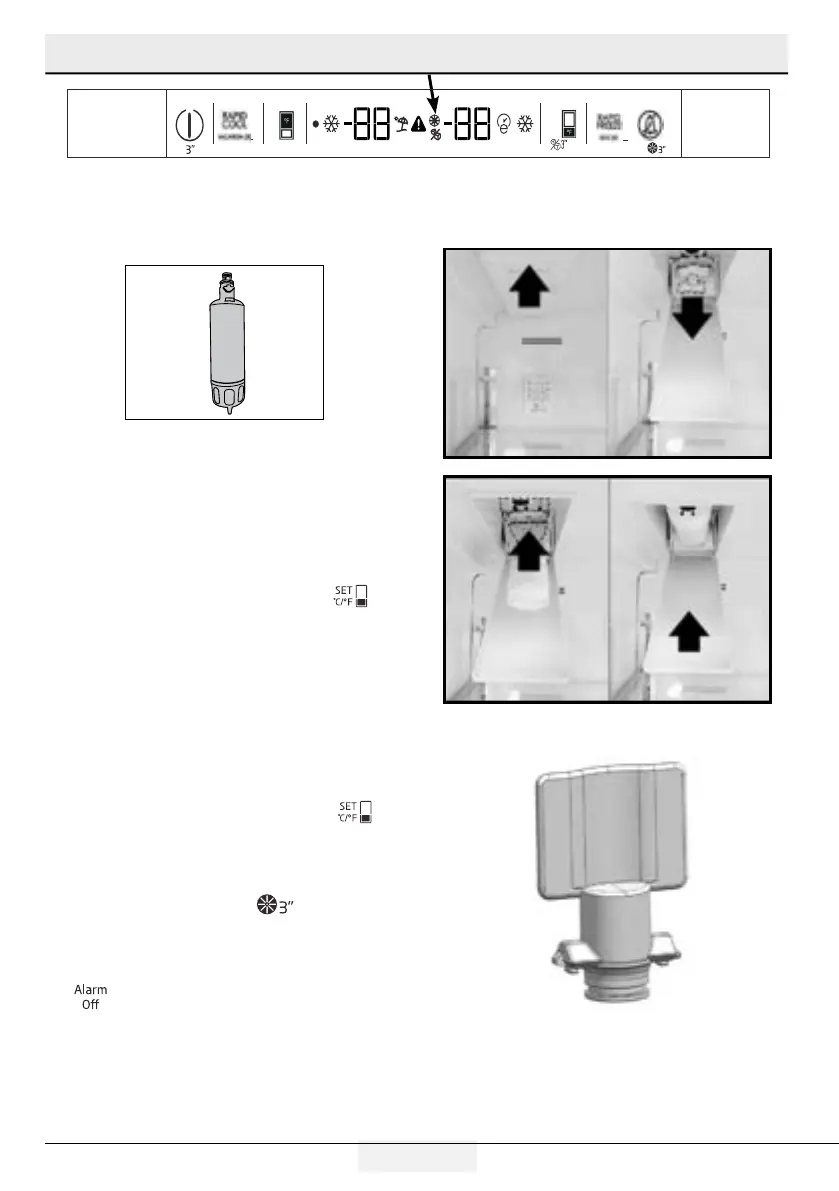
Installing the internal water filter consists of two
steps:
Physically installing the filter
.BLJOHBEKVTUNFOUTUPUIFEJTQMBZ
1.
Press and hold the Freezer Temp Set key for 3
seconds, or until the no ice icon appears in the display.
2.
Slide the filter cover forward to open the filter
compartment.
3.
Tilt the bypass plug down and pull straight out to
remove it.
4.
Insert the filter into the housing and push it up to a
horizontal position.
5.
Close the filter cover and push it back into place.
6.
Press and hold the Freezer Temp Set key
again for 3 seconds.
You have successfully installed your filter.
The Filter End of Life warning
will appear in
approximate 130 days, requiring you to replace
UIFGJMUFSXJUIUIFTBNFTUFQTBTMJTUFEBCPWF"GUFS
SFQMBDJOHUIFGJMUFSQSFTTBOEIPMEUIFi"MBSN0GGw
key for 3 seconds, or until the Filter End of
Life Warning goes out in the display.
BYPASS PLUG


 To Next Page