40
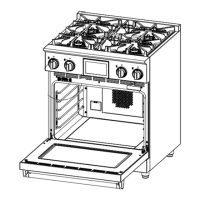
10. Wearing heavy duty gloves, replace the oven floor in the oven, making sure that the seven holes are facing you.
11. Replace the kick panel and secure with the sheet metal screws.
12. Replace the oven door
Grasp the door with both hands on each side of the door handle.
Slide the door hinges into the hinge receiver, making sure that the notch in the hinges is resting properly.
Rotate the hinge clip down into the hinge receiver to secure the hinge. Repeat on the other side.
13. Make sure the door lays flat and parallel to the floor when fully open.
14. Make sure the door closes smoothly and completely with no gap between the door and oven gasket.
15. If not, remove the door and repeat step 12.
16. Replace oven racks.


 To Next Page