05
6.LET`S GET STARTED
● Power On: Long press on the power button. The power button indicator will
illuminate.
● Power Off: Long press of the power button for 2 seconds. The power button
LED indicator will turn off.
7.FEATURES
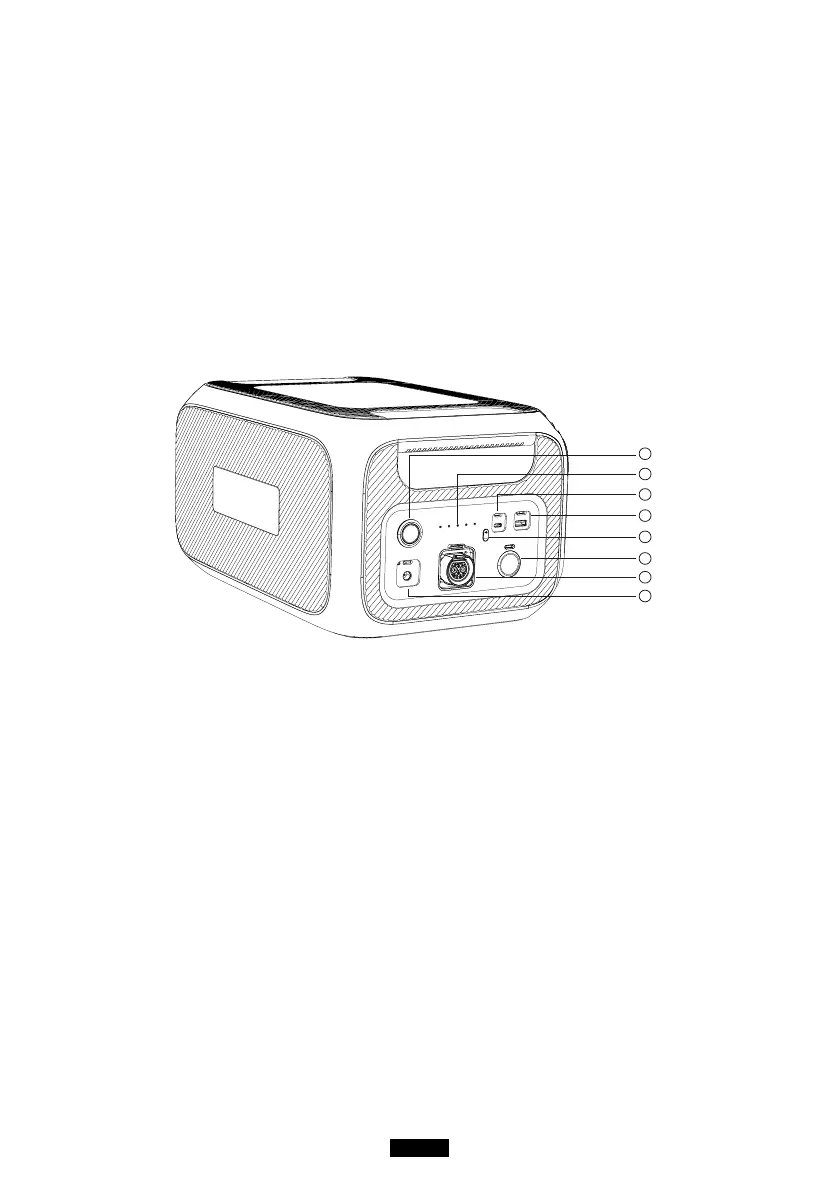
1
3
4
2
5
6
7
8
Power Button
Press to turn ON/OFF the unit.
LED Capacity Indicator
Show the remaining capacity of the
unit(0-20-40-60-80-100%)
USB-C
Can be used via USB-C to USB-C cable to
charge most devices in the market such as
Pixel Phone, Macbook Pro at 100W Max.
USB-A Output Port
Supports QC3.0 protocol.
DC Button
Press to turn ON/OFF DC output.
Cigarette Lighter Port
Output port for devices with corresponding
vehicle, extra solar power via D050S.
plug such as vehicle-use vacuum, mini fridge.
Battery Expansion Port
To connecting B230 with AC200MAX.
Input Port
To charge B230 via T500 adapter. For


 To Next Page