Using the Water Permeable Mopping Cloth
1. This product is equipped with a water tank assembly. If mopping has to be done after the
cleaning work has been completed, the dust compartment can be replaced with a water tank
assembly. Please refer to the [Maintenance] section in this manual for the cleaning method.
2. Do not use the water tank assembly on carpet. When cleaning using the mopping cloth func-
tion, fold over the edge of the carpet to prevent foreign matter on the mopping cloth from
soiling the carpet.
3. Please pay attention while cleaning and add or replace water in time. Remove the water stora-
ge compartment when adding water. When charging, be sure to remove the water permeable
wiper assembly.
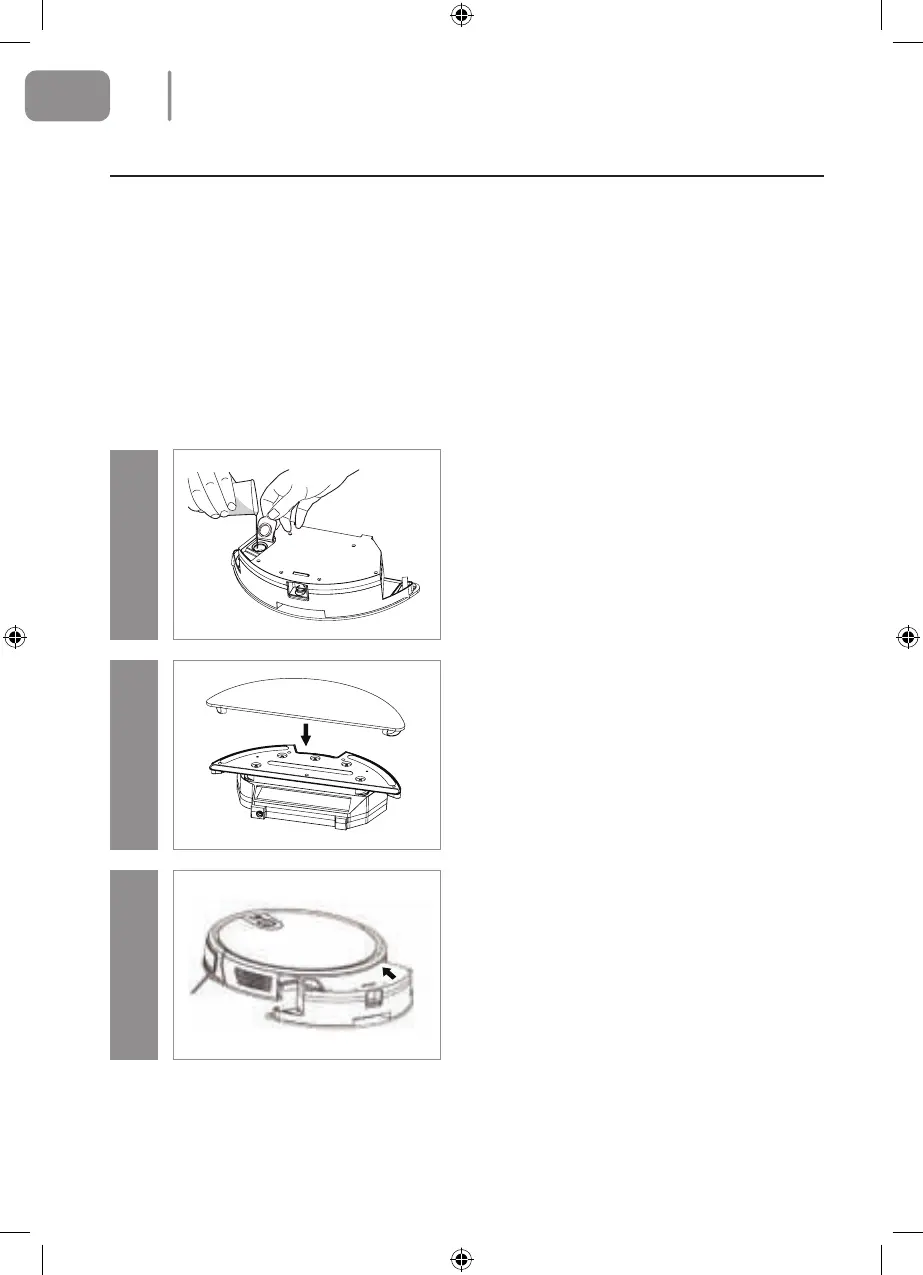
Step 1Step 2Step 3
Add water
Open the water inlet cover and add sucient water.
Attach the mopping cloth
Close the water inlet cover and attach the mopping
cloth.
Install the water tank assembly
Press the dust compartment release button at the
rear of the main unit to remove the dust compart-
ment and replace the water tank assembly.
12
EN
2021-08-11 OCG BluMill Robot Stofzuiger ManualV01.indd 122021-08-11 OCG BluMill Robot Stofzuiger ManualV01.indd 12 23-08-2021 10:0223-08-2021 10:02


 To Next Page