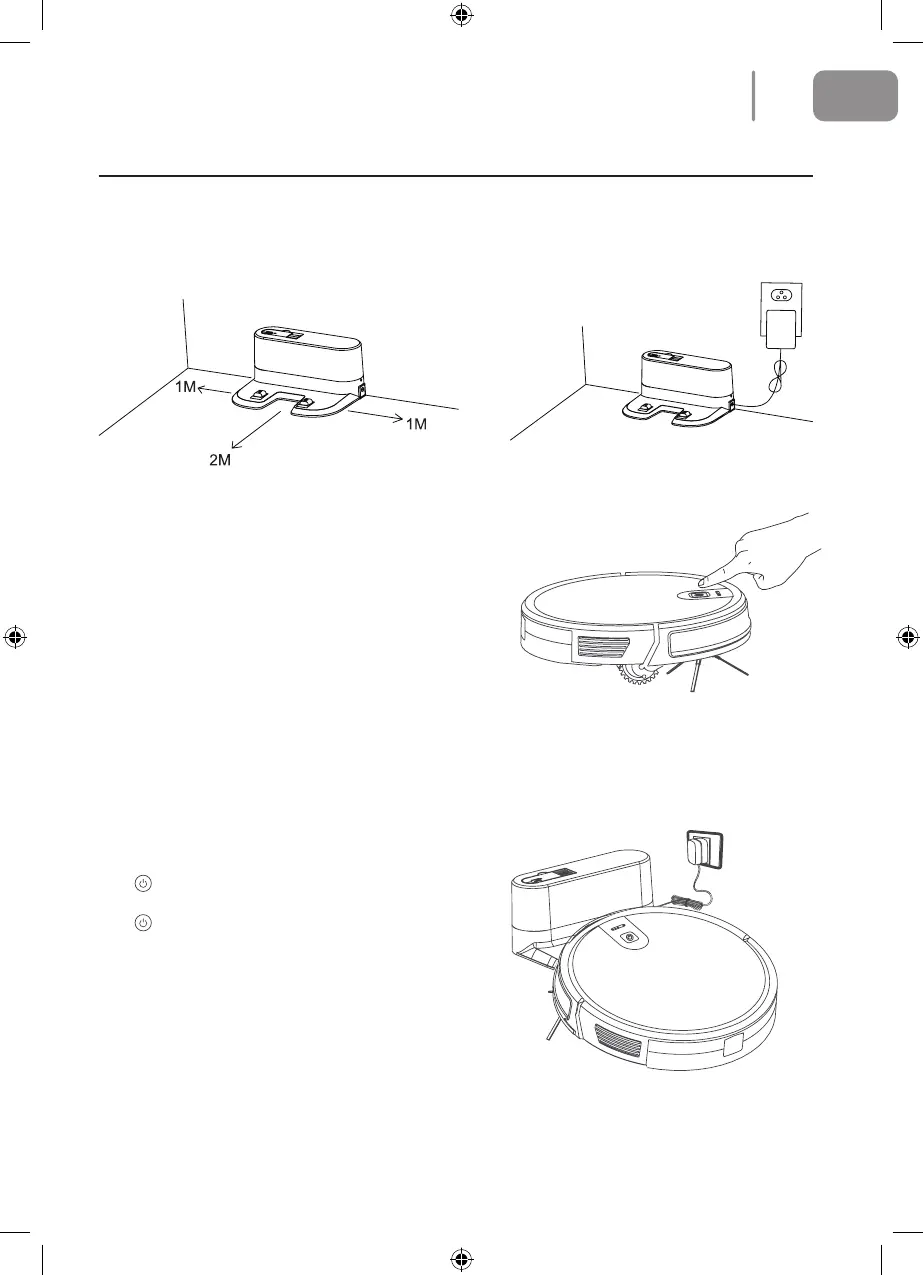
Charging Operation
1. Connect the adapter to the charging dock. Place the charging dock at against the wall. Do not
place objects within 1meter to the left and right and within 2meters to the front. Also make
sure there are no objects nearby with highly reective surfaces such as mirrors
2. Turn On The Main Unit
Press the Start/Pause key to turn on the main
unit. It is advisable to keep the main unit in
the charging dock after each use instead of
immediately shutting it down. This will ensure it
performs properly next time.
Main Unit Charge
Place the main unit in the charging dock
and make sure the charging pole is properly
positioned. Turn on the power switch and the
robot will enter standby mode.
A ashing red light indicates that the battery
needs to be charged.
A ashing blue light indicates the battery is
charging.
Charging will have been completed when the
blue light goes out.
Please charge continuously for more than 6
hours before using for the rst time.
L Note: Please make sure the charging pole is
correctly positioned.
9
EN
2021-08-11 OCG BluMill Robot Stofzuiger ManualV01.indd 92021-08-11 OCG BluMill Robot Stofzuiger ManualV01.indd 9 23-08-2021 10:0223-08-2021 10:02


 To Next Page