Maintenance
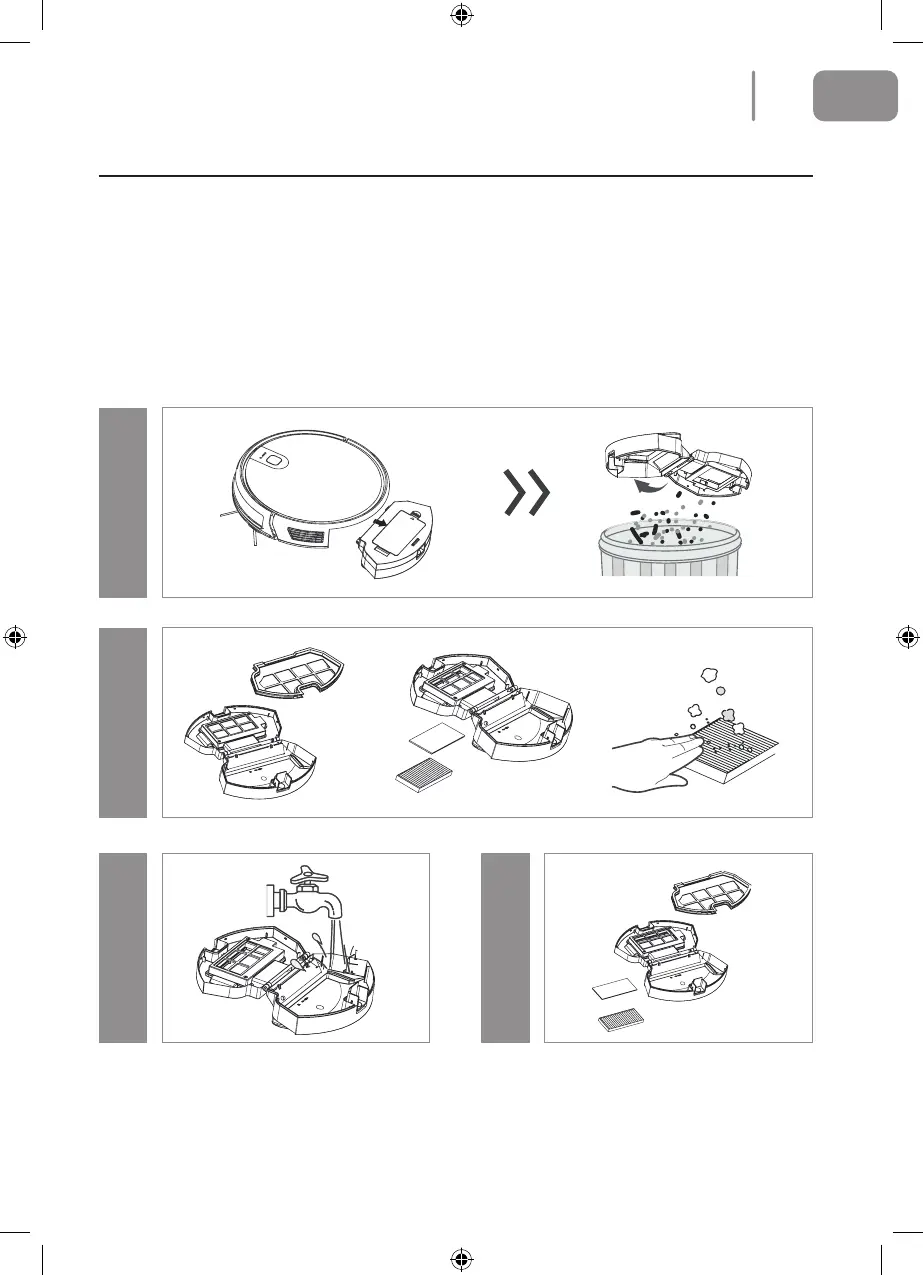
Dust Compartment and Filter
When cleaning and maintaining the main unit and its accessories, turn o the main unit and unplug
the charging dock.
1. Remove the dust compartment, open the dust compartment cover and clean.
2. Remove the dust lter. The HEPA lter should not be washed but should be patted to remove
the dust.
3. Flush the dust compartment and the primary lter.
4. Dry the dust compartment and the dust lter assembly and keep it dry to ensure a long life.
Step 1Step 3 Step 2
Step 4
Let these parts dry naturally for more than 24 hours.
13
EN
2021-08-11 OCG BluMill Robot Stofzuiger ManualV01.indd 132021-08-11 OCG BluMill Robot Stofzuiger ManualV01.indd 13 23-08-2021 10:0223-08-2021 10:02


 To Next Page