P-13
Breeze Smart Handle
User Setup
Please read carefully before setup
Important
Handle Cover
Upon initial use of the Breeze Smart Handle and after a
reset, the handle can be opened by any fingerprint.
The fingerprint sensor and finger that touches the
sensor should always be kept clean, dry and free from
grease.
The fingerprints will remain stored when the battery runs
low and when the battery is changed.
When adding fingerprints, if no further operation is
detected within 12 seconds after each previous
operation, the system will automatically log out.
It is recommended to use this product in an environment
where it will not be exposed to heavy rain, salt water, or
direct sunshine, which could damage the internal
electronics.
It requires 4x AAA alkaline batteries to power the handle.
The batteries will power the handle for 6-8 months
depending on the usage and environment. It is
recommended to change the batteries every 6 months
for optimal performance.
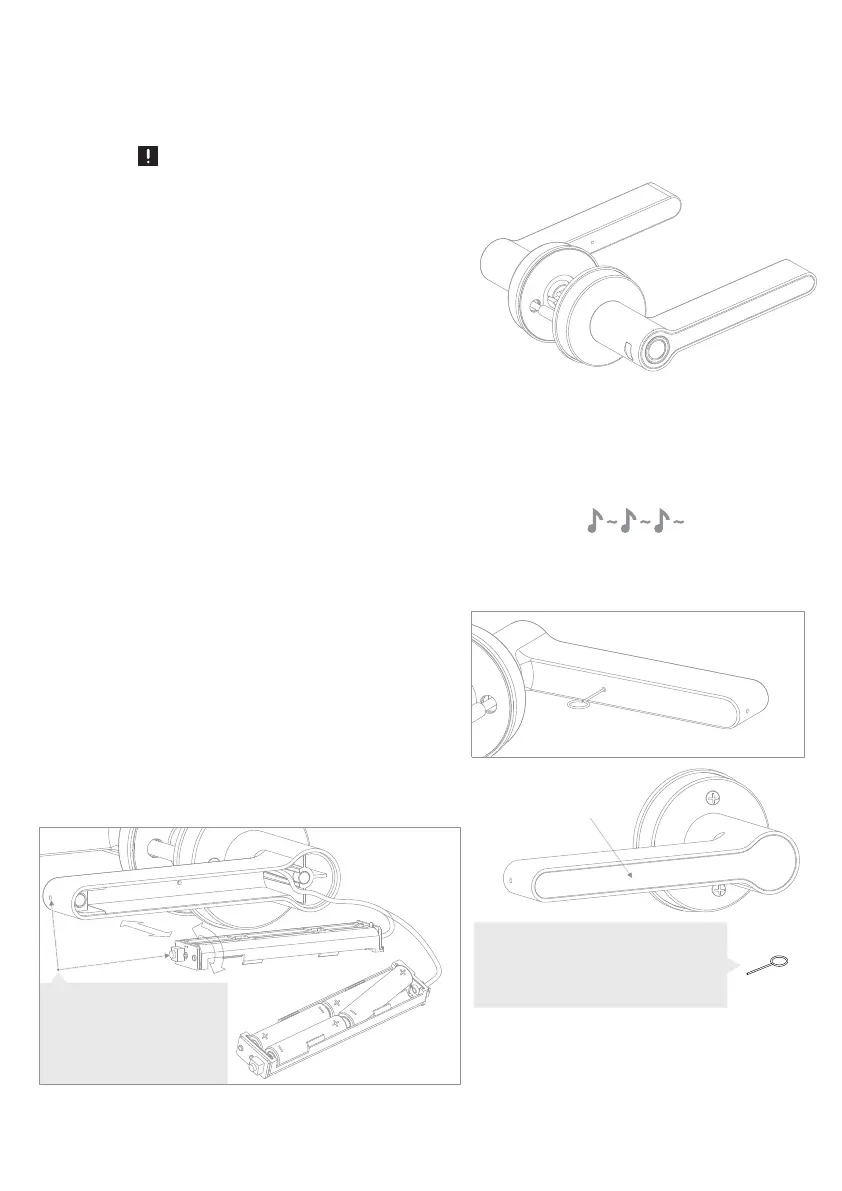
To change the batteries, insert the setting needle
provided into the release hole (located in the middle at
the back of the internal handle grip), then push hard and
the magnetic handle cover will come off.
Pull out the battery cassette and change the
batteries. Put the battery cassette back into
its original position (see diagram) and ensure
the cable is still connected. Put the handle
cover B-1 back on.
Input / Change the Batteries
When the battery is running low, you will hear a long
triple beep when operating the handle. The handle can
be operated approximately 200 times after this warning.
After that, the batteries must be changed.
It is recommended to change the batteries after the first
few low battery warnings.
Low Battery Indication
Note: Please keep the setting needle
safe as it is used to set many
functions on the handle. If you lose
this, it is possible to use a paperclip
to push the set button.
Note: please make sure the
setting button's orientation
is facing the inside of the
handle and aligns with the
hole.



 To Next Page
 Loading...