USER’S MANUAL
32
4.3. Sound Settings
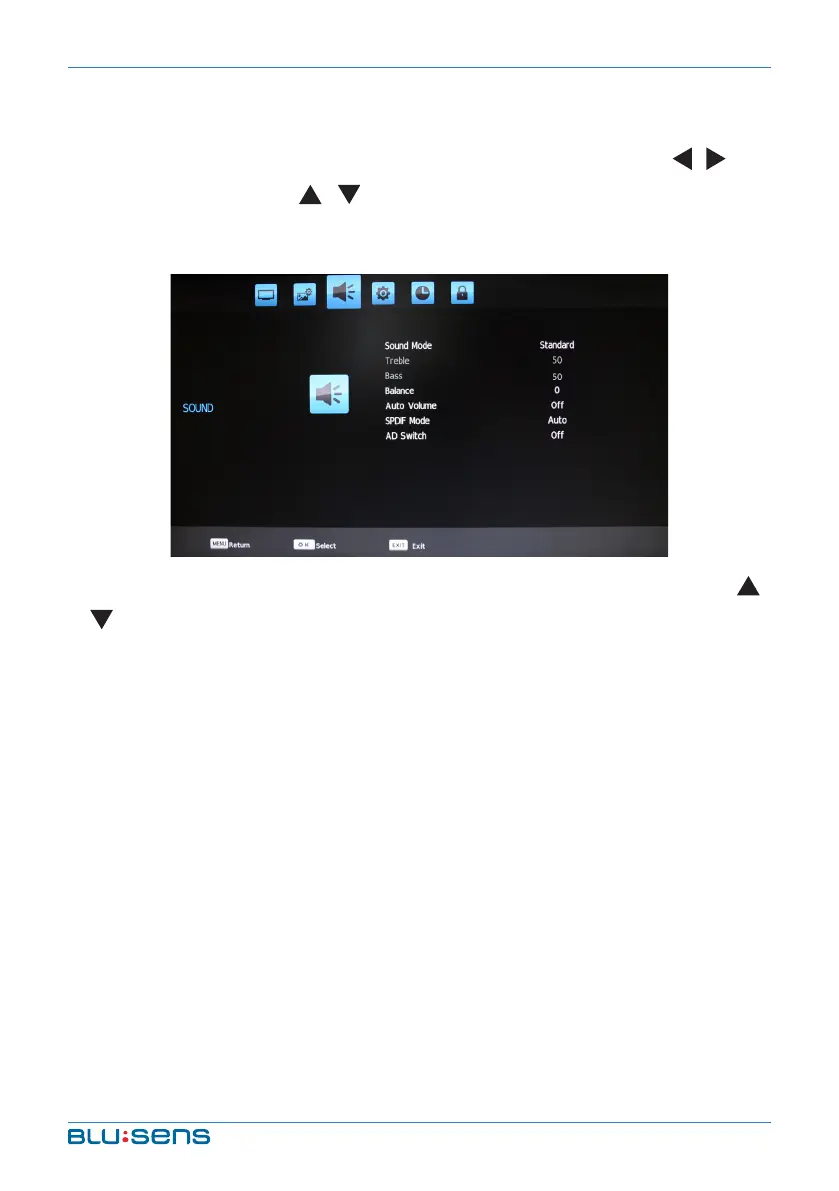
Press the MENU key, Channel menu shows on the screen. Press / key
to select SOUND. Press / key to select item you´d like to adjust or set.
Press OK key to enter into Sound Mode submenu.
After selecting Sound mode, press OK key to enter into submenu. Press
/ key to select item you´d like to adjust or set.
Sound Mode: Select Sound Temperature between five modes:
Standard, Music, News, Sports and User.
Treble: Adjust treble value; increasing analog value increases treble,
decreasing analog value decreases treble (0-100).
Bass: Adjust bass value; increasing analog value increases bass,
decreasing analog value decreases bass (0-100).
Balance: Adjust balance of left or right sound; increasing analog
value decreases left volume, decreasing analog value decreases right
volume (0-100).
After selecting Auto Volume, press OK key yo select “On” or “Off”, open or
close Auto Volume function.


 To Next Page