8
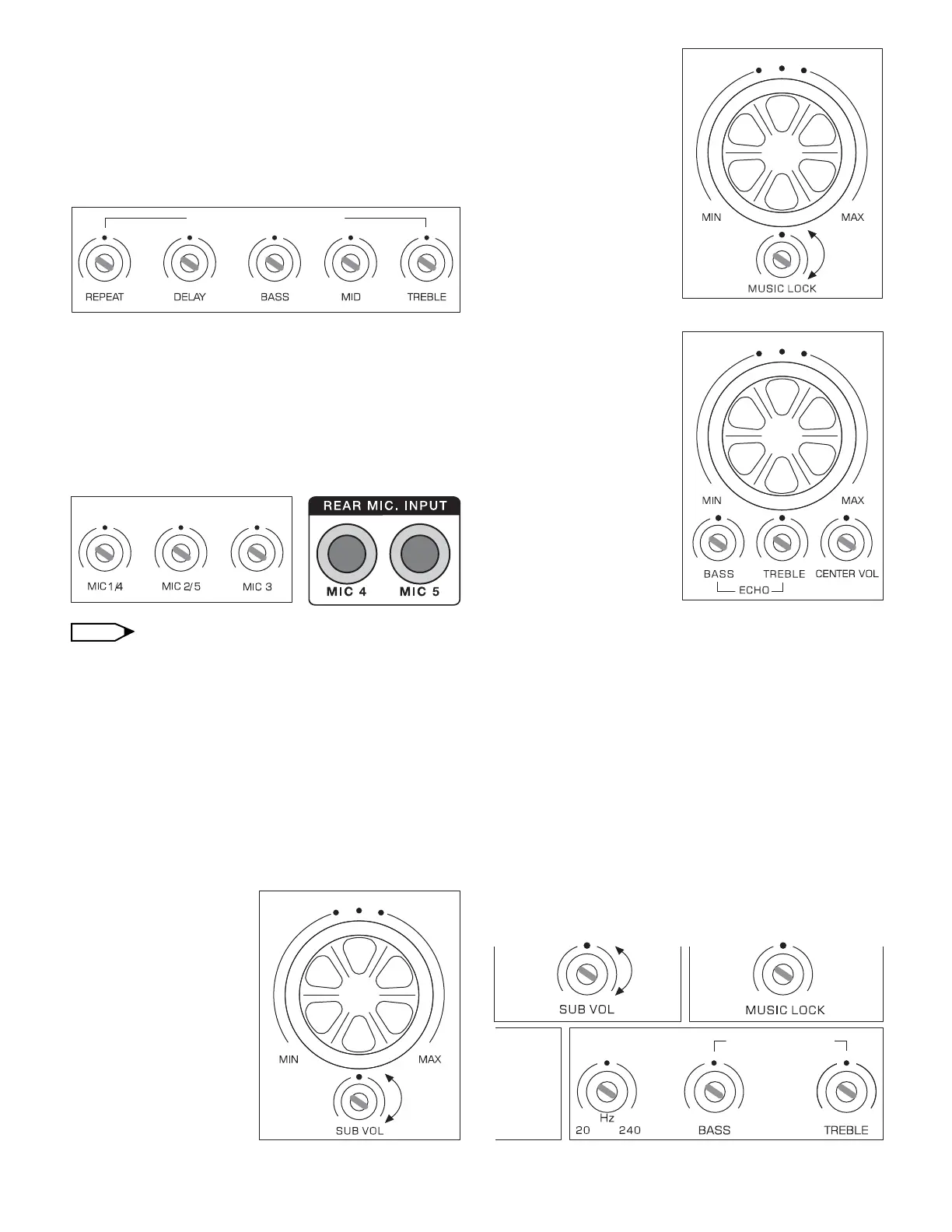
11. Microphone Tone (Adjustable)
Repeat Adjust: For vocal timing repeat (button #19)
Delay Adjust: For vocal timing delay (button #20)
Bass Adjust: For vocal low frequency (button #21)
Mid Adjust: For vocal mid-tone frequency (button #22)
Treble Adjust: For vocal high frequency (button #23)
12. Microphone Volume (Adjustable)
Mic Input Level (Mic 1 front/4 rear): For mic input
level adjustment.
Mic Input Level (Mic 2 front/5 rear): For mic input
level adjustment.
Mic Input Level (Mic 3): For mic input level adjustment.
Mic 1/4: Mic 1 is the front mic. input and Mic 4 is
rear input. They are connected to each other. When
adjusting Mic 1/4, it will affect both Mic 1 and 4.
Mic 2/5: Mic 2 is the front mic. input and Mic 5 is
rear input. They are connected to each other. When
adjusting Mic 2/5, it will affect both Mic 2 and 5.
You may connect your wireless microphone systems
from the rear Mic inputs (rear input terminals 4/5) for
more organized design.
13. Mic Master Volume:
Mic level input
adjustment for all
microphone inputs.
(button #15)
14. Sub Volume: For
adjusting subwoofer
output level (button #14)
15. Music Volume:
Music level adjustment
for audio inputs (button
#17)
16. Music Lock: Set the
music gain output to a
certain level for
protection.
17. Echo Volume: Echo
level adjustment for all
microphone inputs
(button #12)
18. Echo (Adjustable)
Bass Adjust: For
adjusting echo low
frequency (button #10)
Treble Adjust: For
adjusting echo high
frequency (button #11)
19. Center Volume: For adjusting center speaker
output level (button #13)
20. Sub/Freq: Bass signal frequency response
adjustment (button #30). Rear connection for powered
subwoofer or amplifier. You may adjust subwoofer
volume from front panel (button #14).
21. Music Tone
Bass Adjust: Music bass output control level (button #
31)
Treble Adjust: Music treble output control level (button
#32)
MIC R O PHO N E VO L U ME
MIC R O PHO N E TO N E
NOTE
MU S I C T O N E
ECH O VO L U ME
MUS I C V O LUM E
MIC M AS T E R V O LUM E


 To Next Page