Controls
71
Reference At a glanceDriving tipsCommunications NavigationEntertainmentMobility
Resetting the Trip computer
1. "Vehicle Info"
2. "Trip computer"
3. Select
> "Reset" all values are reset
> "Automatically reset" all values are reset
approx. 4 hours after the engine is
switched off
Settings and information
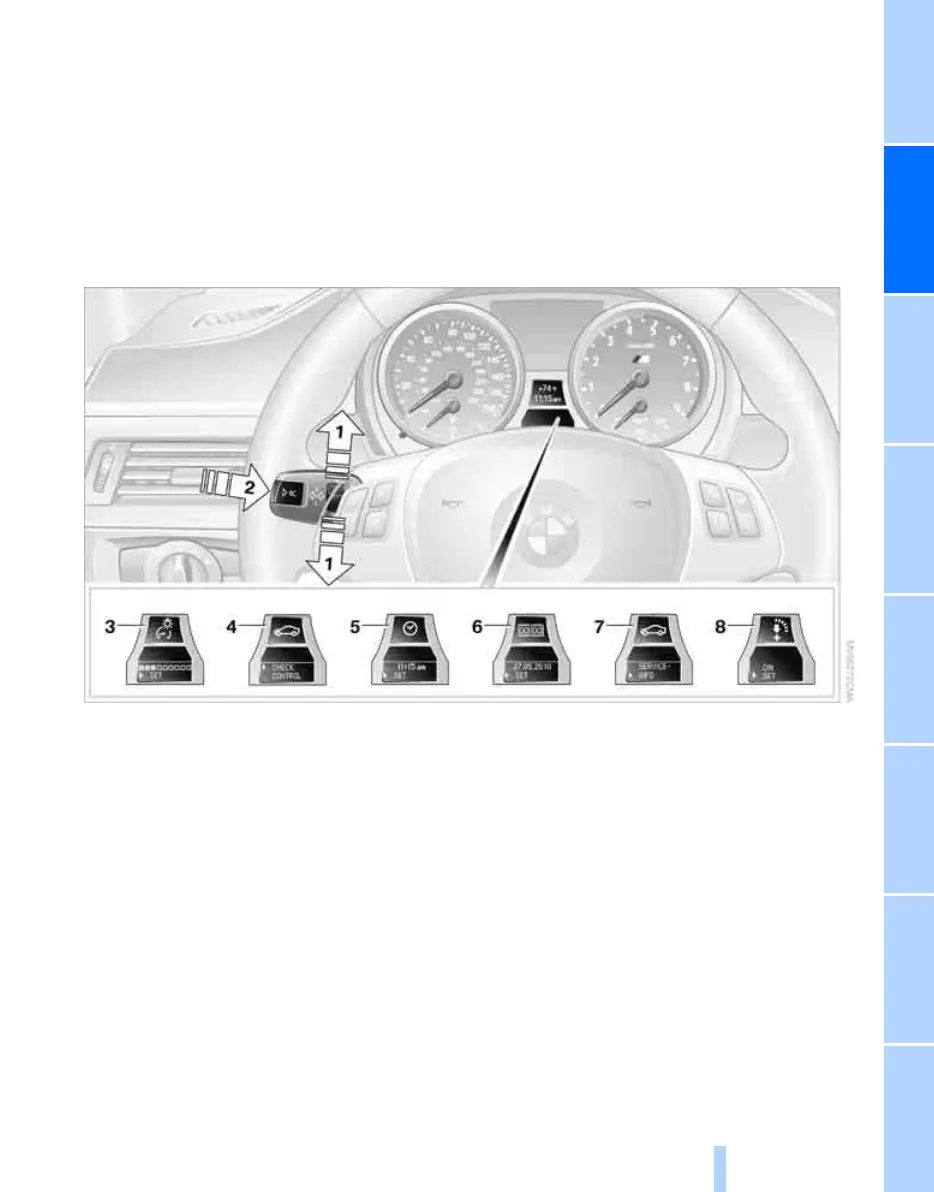
Operating principle
1 Button for:
> Selecting display
> Setting values
2 Button for:
> Confirming selected display or set val-
ues
> Calling up computer information 69
3 When the lights are on: instrument lighting
brightness 94
4 Calling up Check Control 76
5 Setting the time 74
6 Setting the date 75
7 Viewing service requirement display 72
8 Switching Shift Lights
* on/off 62
Exiting displays
The outside-temperature reading and the time
reappear when you press button 2 or if you
make no entries within approx. 15 seconds. If
required, complete the current setting first.
Units of measure
Setting the units of measure
You can change the units for fuel consumption,
route/distance, temperature and pressure.
iDrive, for operating principle refer to page 16.
ba8_E9293M3_cic.book Seite 71 Dienstag, 19. August 2008 12:01 12
Online Edition for Part no. 01 41 2 600 999 - © 08/08 BMW AG



 To Next Page