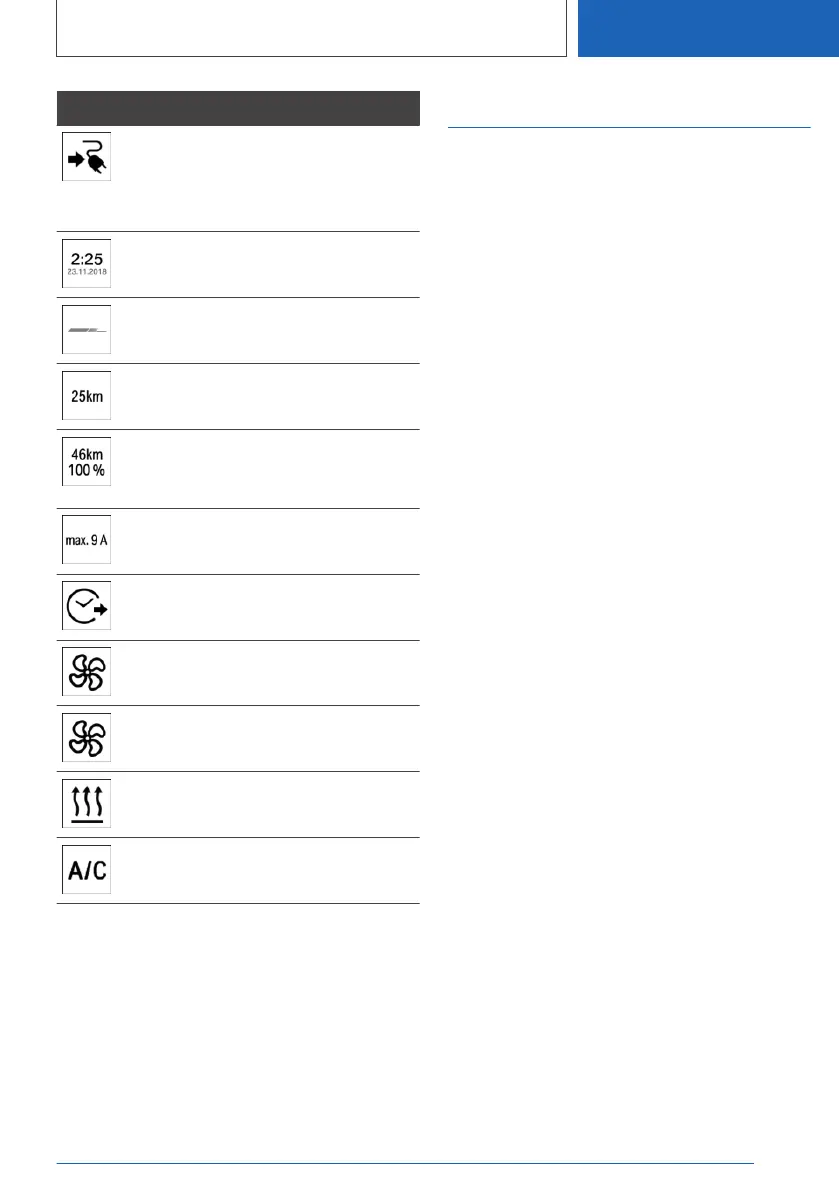
Display Meaning
Plug blue: charging process active or
completed.
White plug: charging procedure inter‐
rupted.
Time for end of charging.
Set departure time.
Charge continuation bar.
Display in blue: charged electrical
range.
Display in white: current maximum
available electric range when high-
voltage battery is fully charged.
Maximum current limitation or cur‐
rent limitation that is actually set.
Departure time set.
Air conditioning activated for depar‐
ture time.
Flashing: ventilation active.
Flashing: heating active.
Flashing: cooling active.
For further information:
Charge screen, see page 176.
Departure time
Principle
For optimum range and air conditioning, the de‐
parture time can be set before stopping the vehi‐
cle.
General
With a set departure time, the vehicle is prehea‐
ted or precooled if climate control is set.
The following settings for departure time are
possible:
▷ Air conditioning for departure time.
▷ Planning up to three regular departure times.
▷ Planning a one-time departure time.
If the drive-ready state is switched off, changes
can be made using iDrive. Settings for acclimati‐
sation and loading process are accepted for
planned departure times too.
Air conditioning for departure
time
1.
"CAR"
2. "Plan charg./climate"
3. Tilt the Controller to the right.
4. "Precond. departure"
Setting the departure time
1.
"CAR"
2. "Plan charg./climate"
3. Tilt the Controller to the right.
4. "Departure schedule"
5. Select the required departure time.
6. Set the time and day of the week.
Up to three regular departure times can be set
and a one-time departure time can be set.
Seite 363
Charging vehicle
MOBILITY
363
Online Edition for Part no. 01405A1EA53 - X/20



 To Next Page