well as management of driver profiles and setting
options for the vehicle and iDrive.
Apps
Management of apps, access to apps as well
as vehicle functions. Additional apps and vehicle
functions can be obtained from the BMW Store.
Widgets
Widgets provide quick access to fre‐
quently used functions. The defined widgets dis‐
play dynamic content – for example, the naviga‐
tion map – and also serve as buttons.
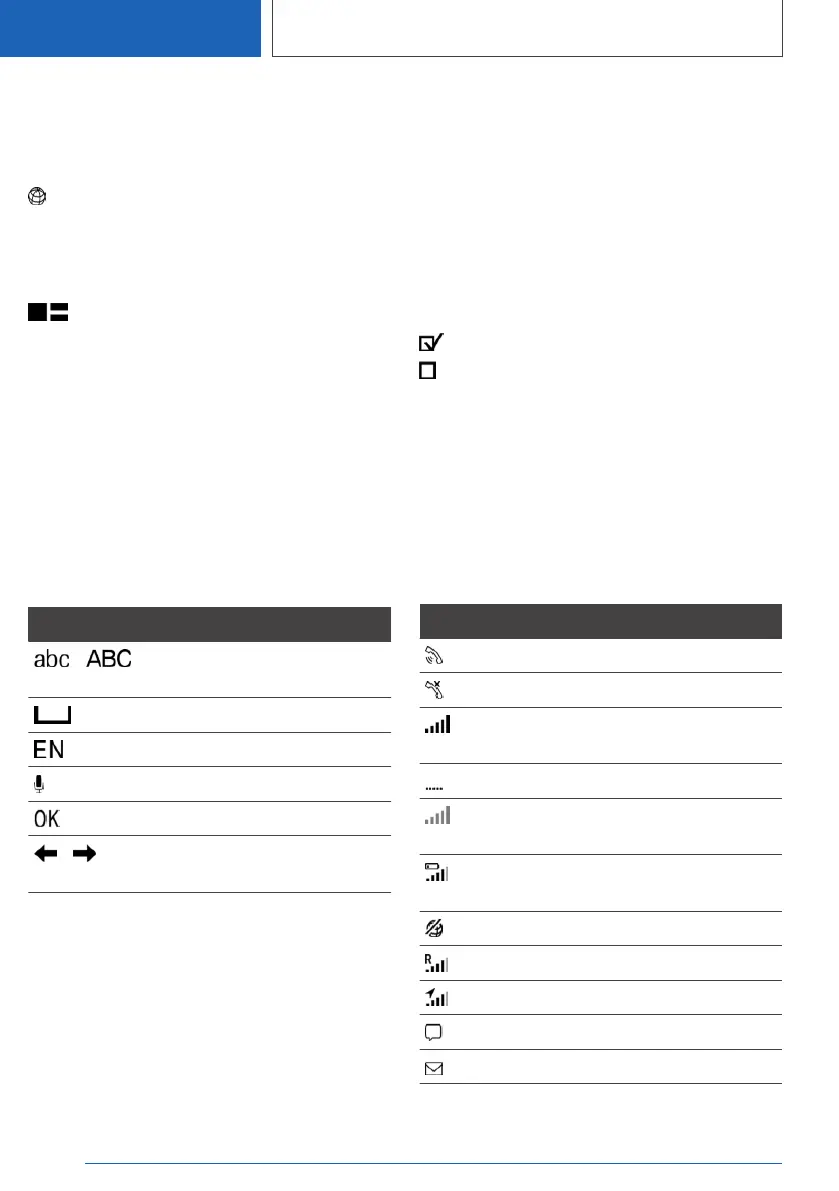
Letters and numbers
Letters and numbers can be selected when the
destination is entered, for example.
Letters and numbers can be entered using the
Controller and, depending on the vehicle equip‐
ment, using the touchscreen or voice control
system. The keyboard display changes automati‐
cally.
Symbol Function
Switch between upper and
lower case.
To enter a space.
Switch between languages.
To use the voice control.
To confirm your entry.
Move the entry area to the left
or right.
Entry comparison
When entering names and addresses, the selec‐
tion is gradually narrowed down or may be sup‐
plemented with every subsequent letter and
character entered.
Inputs are continuously compared with the data
saved in the vehicle.
▷ Only letters and characters for which data is
available are offered when making an entry.
▷ Destination search: place names can be en‐
tered in all languages available in iDrive.
Enabling/disabling functions
Some menu items are preceded by a checkbox.
The box indicates whether the function is ena‐
bled or disabled. Selecting the menu item ena‐
bles or disables the function.
Function is enabled.
Function is disabled.
Status information
General
The status field is located in the top area of the
Control Display. Status information is displayed
in the form of symbols.
Symbols for telephone
Symbol Meaning
Incoming or outgoing call.
Missed call.
Reception level of mobile telephone
network.
Searching for network.
No mobile telephone network avail‐
able.
Mobile telephone charge level is crit‐
ically low.
Data transfer not possible.
Roaming active.
Location active.
Text message received.
Message received.
Seite 56
CONTROLS
iDrive
56
Online Edition for Part no. 01405A1EA53 - X/20



 To Next Page