Overview
17
Reference ControlsDriving hintsCommunication NavigationEntertainmentMobility
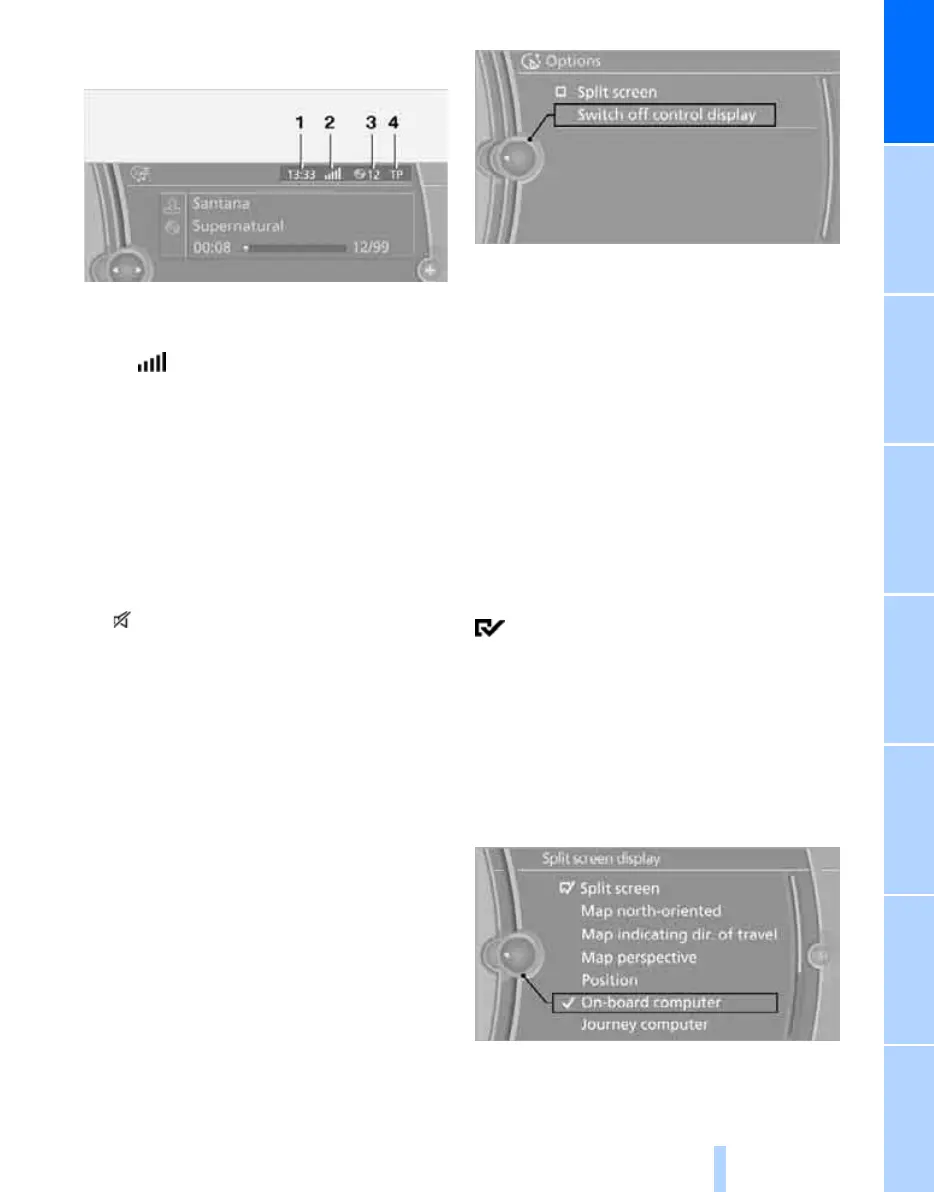
Status information
1 Time
2 Display for:
> Reception level of mobile telephone
network, depending on mobile phone
> Incoming and outgoing, missed call
> Receiving an SMS
*
3 Display for:
> Entertainment:
Radio, CD/DVD, external devices
> Telephone
*
:
Name of the mobile phone logged on in
the vehicle
4 Sound output switched off or
display for traffic announcements
*
:
> "TP":
Traffic Program is on.
> No display:
Traffic Program is switched off.
Other displays:
Status information is temporarily hidden during
Check Control message displays or inputs via
the voice control system
*
.
Switching the Control Display
off/on
1. Press the OPTION button.
2. "Switch off control display"
Press the controller to switch on.
Navigation system Professional: split
screen
In the split screen view, additional information
can be displayed in the right-hand section, e.g.
information from the on-board computer.
This information remains visible in the split
screen view even if a switch is made to another
menu.
Switching the split screen view on and
off
1. Press the OPTION button.
2. "Split screen"
The split screen view is switched on.
Selecting the display for split screen
content
With the split screen switched on, you can
select the displayed content.
1. Tilt the controller repeatedly to the right
until the split screen content is selected.
2. Select the display.
Online Edition for Part no. 01 41 2 602 816 - © 08/09 BMW AGOnline Edition for Part no. 01 41 2 602 816 - © 08/09 BMW AG



 To Next Page