Map
Vehicle equipment
This chapter describes equipment, systems and
functions which are offered or will be offered on
a model-specific basis, even if they are not inclu‐
ded in the vehicle in question.
For further information:
For detailed information about the described ve‐
hicle equipment, see Owner's Handbook for the
vehicle.
M
ap
Calling up the map
1.
Press the button on the Controller.
2. If necessary, "Map"
Map view
General
The map can be operated using iDrive.
For further information:
iDrive, see Owner's Handbook for the vehicle.
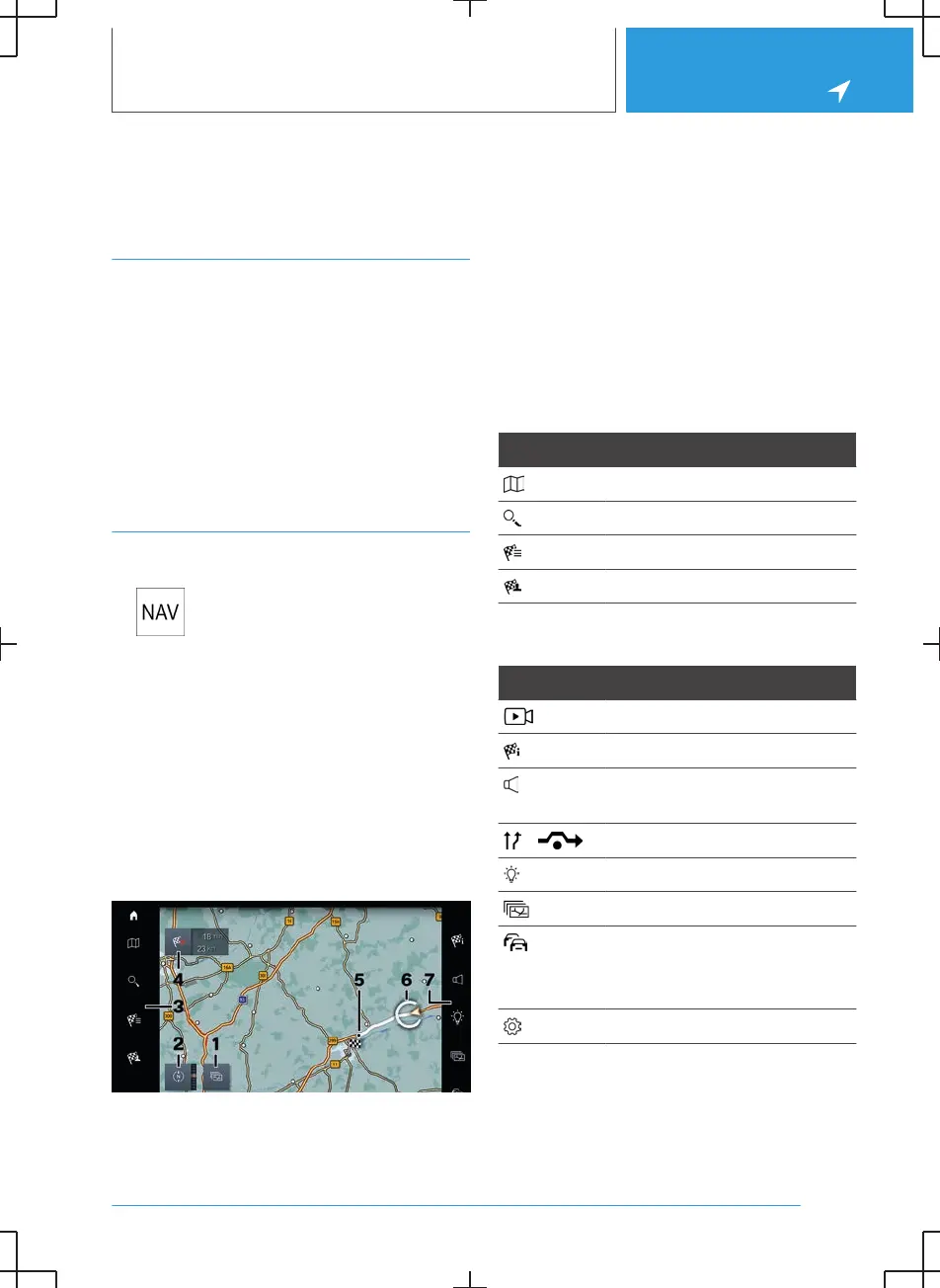
Overview
1 Changing the map mode
2 Changing the map view
3 Toolbar, left
4 Status field
5 Planned route
6 Location
7 Toolbar, right
Toolbar, left
Icon Function
Go to the map.
Go to the destination entry.
Display recent destinations.
Display my destinations.
Toolbar, right
Icon Function
Calling up demo mode.
Go to active route guidance.
To switch spoken instructions
on/off.
Displaying alternative routes.
Display suggestions.
Change map mode.
Real Time Traffic Information
RTTI.
Status of RTTI.
Go to settings.
Status field
The following information is displayed:
Seite 13
Map
NAVIGATION
15



 To Next Page