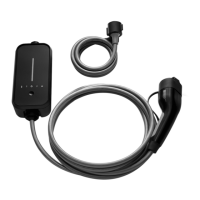
This document provides instructions for the BMW i Wallbox, a charging station designed for electric or plug-in hybrid vehicles. The manual covers essential information for safe and effective operation, maintenance, and troubleshooting of the device.
Function Description
The BMW i Wallbox serves as a charging station for electric or plug-in hybrid vehicles, facilitating the charging of their high-voltage batteries. It is designed for both indoor and outdoor installation, typically mounted on a wall or a column. The device's primary function is to provide a reliable and safe connection for charging, ensuring compliance with relevant national regulations for installation and connection. The Wallbox is equipped with a status LED that provides visual feedback on its current state, including active charging cycles, self-tests, and potential faults.
Usage Features
The Wallbox is straightforward to operate, with key features designed for user convenience and safety:
- Displays and Controls: The main interface includes a Status LED, a charging cable plug holder, and the charging cable plug itself. The Status LED is crucial for understanding the device's operational status.
- Starting a Charging Cycle:
- When not in use, the Status LED is permanently lit in blue.
- To begin, connect the vehicle to the Wallbox.
- The Status LED will then light up in orange for a few seconds, indicating that internal self-tests are being performed.
- After successful self-tests, the Status LED turns blue, signifying that the vehicle is connected and the charging cycle can be initiated from the vehicle.
- During an active charging cycle, the Status LED flashes in blue. The start of the charging cycle can be delayed based on vehicle settings.
- Ending a Charging Cycle: The charging cycle is terminated by releasing the vehicle and disconnecting the charging cable. Specific instructions for this process are typically found in the vehicle manufacturer's manual.
- Storing the Charging Cable: For safekeeping and to maintain order, the charging cable should be coiled around the Wallbox, and the charging cable plug placed in its designated holder.
- Status LED Information: The Status LED consists of four segments (S1 to S4) that can be lit or flash in various colors, either together or individually, to convey different states:
- Temperature Cut-out: If the Wallbox's maximum temperature limit is exceeded, the charging cycle is temporarily stopped. Segments S3 and S4 of the Status LED will flash in orange. The charging cycle automatically restarts once the device has cooled down.
- Commissioning Mode: During commissioning, segments S2 and S3 of the Status LED are lit in orange.
- Faults: In the event of a fault, the Status LED will display specific color codes, detailed in the troubleshooting section of the manual.
Maintenance Features
Proper maintenance is essential for the longevity and safe operation of the BMW i Wallbox:
- Cleaning:
- The housing of the Wallbox Pure should be cleaned with a damp cloth.
- For stubborn dirt, a mild, solvent-free, non-scouring cleaning product can be used.
- It is crucial to avoid aggressive solvents, scouring materials, water jets (like pressure cleaners), and excessive pressure, as these can damage the device.
- BMW recommends specific cleaning and care products: special matt paint cleaner (number 83 12 2 285 244) for the housing and glass cleaner (number 83 12 2 288 901) for high-gloss surfaces.
- Maintenance and Repair Work:
- Any repair work must only be carried out by trained personnel.
- Before contacting a service partner, users should consult the troubleshooting guide in this manual and the vehicle's manual.
- It is advisable to note the model version and serial number, found on the model plate on the right-hand side of the Wallbox, when seeking support.
- Software Update:
- The Wallbox's software can be updated via a USB connector located inside the device. Accessing the USB connector requires removing the housing cover and terminal panel cover.
- Instructions for software updates are provided with the update package.
- The latest software versions, which may incorporate changed standards or improve compatibility with new electric or plug-in hybrid vehicles, can be downloaded from the BMW charging portal.
- Troubleshooting: The manual includes a comprehensive troubleshooting guide for common issues, such as the Status LED not lighting up, charging process not starting, vehicle not fully charging, or the charging cable plug being stuck. It also details error codes displayed by the Status LED (e.g., flashes in red, permanently lit in red, or specific red and blue combinations) and their possible causes and solutions.
- Resetting Errors: If an interruption occurs during a connection or charging cycle, the Wallbox will attempt to restart the cycle automatically up to five times. If the cycle cannot be restarted, it must be manually ended, or the Wallbox may need to be restarted. Persistent errors without an obvious cause require contacting a service partner.
- Regular Inspections: The Wallbox should be regularly checked for defects on the socket or charging cable plug (including the cable itself) and for signs of damage to the housing through visual inspection. Before each charging session, a visual inspection for damage, dirt, or moisture on the charging plug, cuts or chafing on the cable, and secure fastening of the cable output from the Wallbox is recommended.



 To Next Page


 General