4. "Gesture control"
5. "Gesture control"
Settings
1. Apps menu
2. "Vehicle"
3. "System settings"
4. "Gesture control"
5. Select the desired setting.
Carrying out gestures
▷ Perform gestures underneath the interior
mirror and next to the steering wheel.
▷ Execute gestures clearly.
▷ The gestures can also be executed from
the front-passenger side.
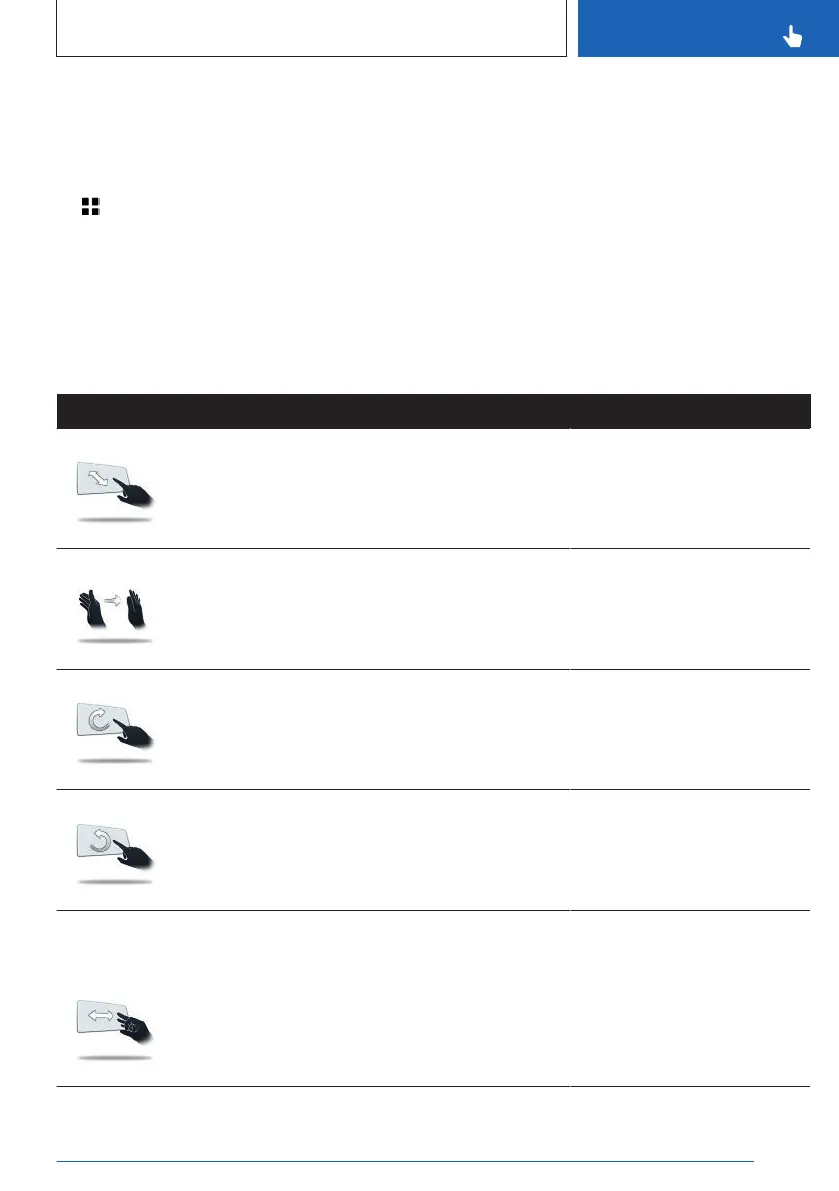
Possible gestures
Gesture Operation Function
Move extended index finger forward and
backward in the direction of the control
display.
Accept call.
Select a highlighted entry in a
list during voice control.
Confirm pop-up.
Swipe the hand in front of the control
display in the direction of the passenger
seat.
Reject call.
Close pop-up.
End voice control.
Move extended index finger slowly in a
clockwise circular movement.
Gesture is detected after one circular
movement.
Increase the volume.
Move the extended index finger counter-
clockwise in a circular movement.
Gesture is detected after one circular
movement.
Reduce the volume.
Depending on the
equipment:
Bring thumb and index finger together
and move the hand to the right or left.
Turn vehicle in the Live Vehi-
cle view.
3D view: rotate camera view.
This gesture can only be exe-
cuted while the vehicle is sta-
tionary.
Seite 59
BMW iDrive
CONTROLS
59
Online Edition for Part no. 01405A88D67 - VI/23



 To Next Page