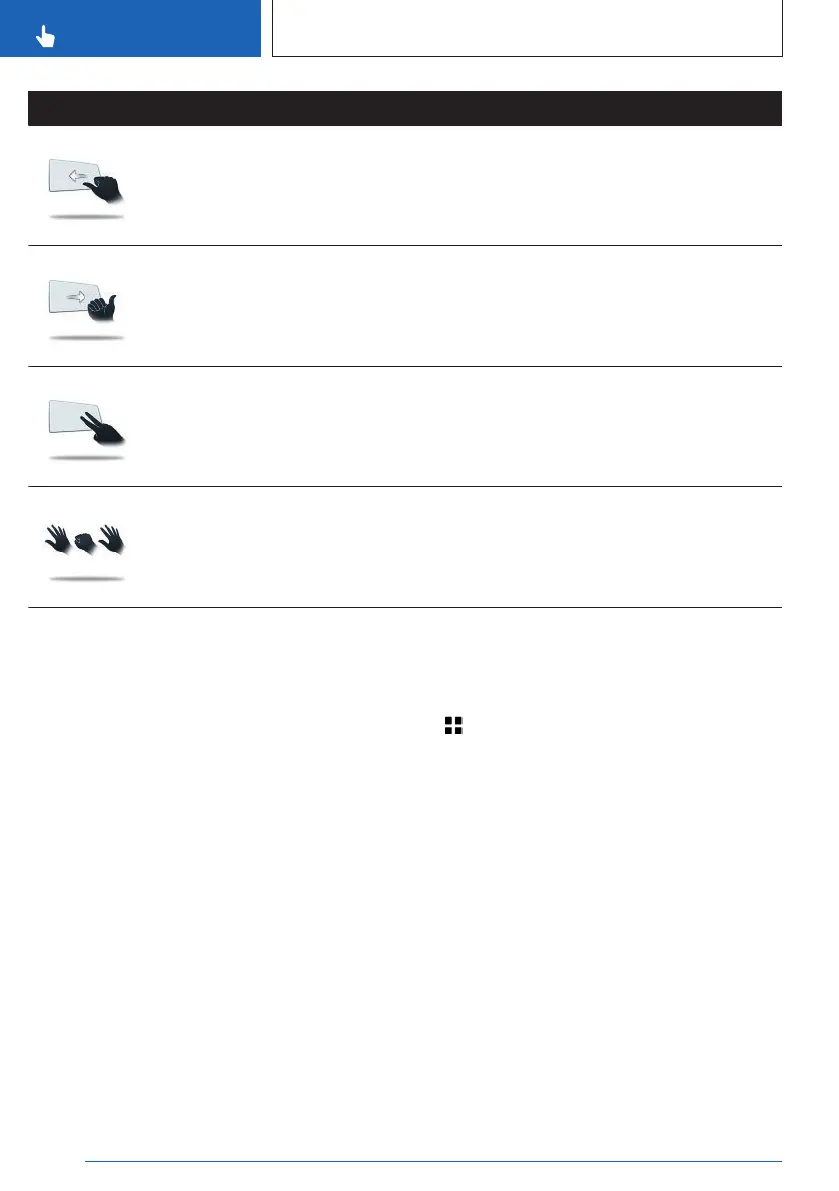
Gesture Operation Function
Move fist with thumb extended to the left
back and forth.
Reverse Skip function.
The previous title is played.
Move fist with thumb extended to right
left back and forth.
Forward Skip function.
The next title is played.
With the index and middle fingers ex-
tended, point into the direction of the
control display.
Perform individually assigna-
ble gesture.
Stretch out five fingers, form a fist and
stretch five fingers out again.
Perform individually assigna-
ble gesture.
Assigning gesture individually
General information
Two gestures can be assigned individually and
can be configured as shortcut for certain func-
tions such as:
▷ Destination guidance to home address.
▷ Mute/Playback
▷ Control display on/off
Gesture shortcuts can only be created with an
active BMW ID or a driver profile.
Configure gesture shortcut
The desired function can be selected directly in
every menu and configured as shortcut.
1.
Press and hold the desired menu item.
2. "Add to gesture shortcuts"
3. Select the desired gesture.
Select function
Some defined functions can be selected di-
rectly in the menu for gesture control.
1. Apps menu
2. "Vehicle"
3. "System settings"
4. "Gesture control"
5. "Point two fingers at display" or "Show five-
o-five fingers"
6. Select the desired setting.
System limits
Gesture recognition by the camera in the
headliner can be disturbed by the following cir-
cumstances:
▷ The camera lens is covered.
▷ Objects are located on the interior mirror.
Seite 60
CONTROLS
BMW iDrive
60
Online Edition for Part no. 01405A88D67 - VI/23



 To Next Page