Navigator III Owner’s Manual
creatinG and editinG roUtes
creatinG and editinG roUtes
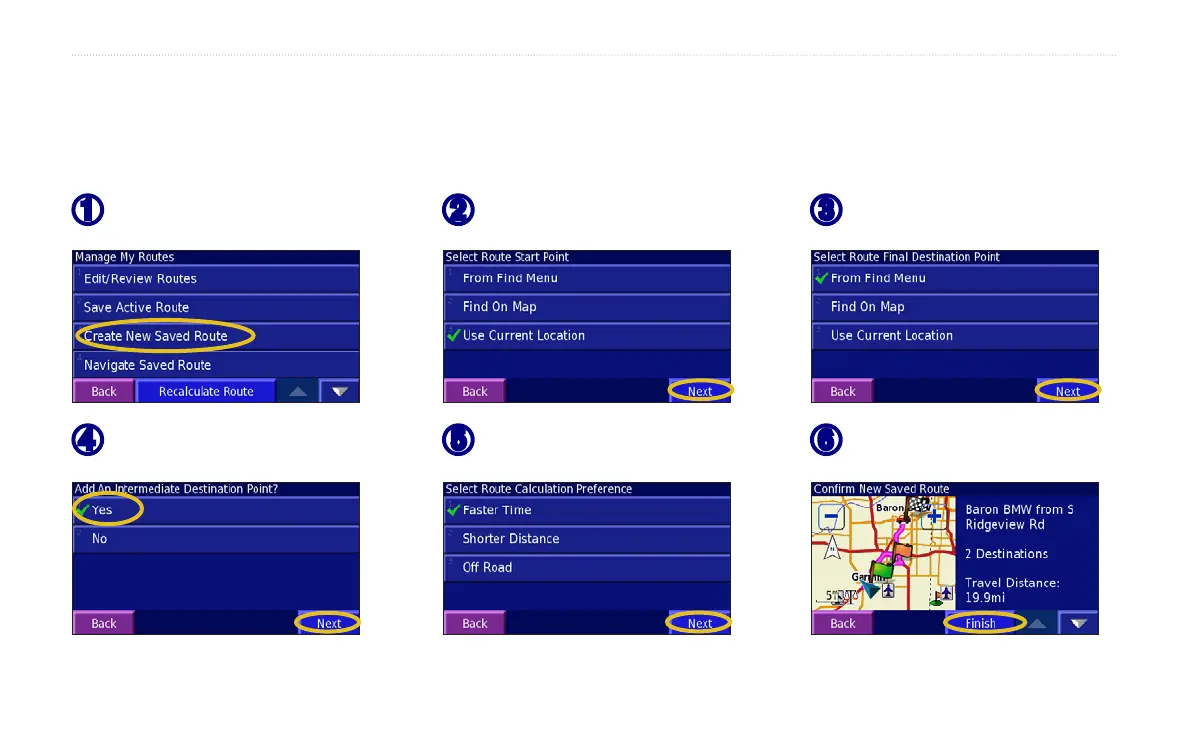
Creating a New Saved Route
You can store up to 50 saved routes. From the Main menu, touch Tools > My Data > Routes. TIP: Press and hold the MENU key to open the Routes
menu.
➊
Touch Create New Saved Route.
➋
Touch an option, and touch Next.
Select the start point.
➌
Touch an option, and touch Next.
Select the end point.
➏
Touch Finish.
➎
Select sort and route calculation
preferences, and touch Next.
➍
To add a stop, touch Yes, then
touch
Next. Select the point.


 To Next Page