Adjustments
54
MDrive*
With MDrive you can configure several individ-
ual settings for your vehicle on the Control Dis-
play and activate them using the button on
the steering wheel.
Configuring settings
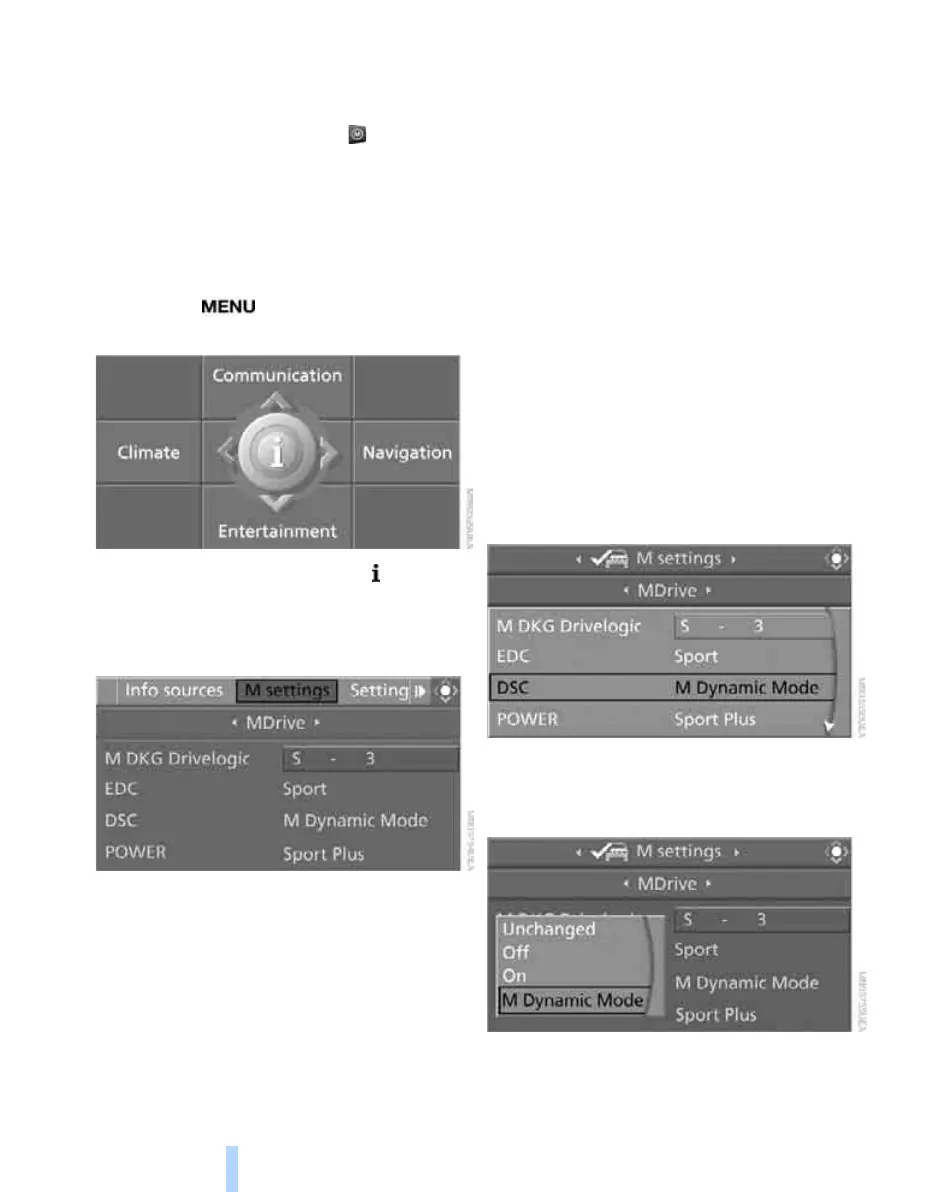
You can set MDrive on the Control Display
when the ignition is switched on.
iDrive, for operating principle refer to page 16.
1. Press the button.
This opens the start menu.
2. Press the controller to open the menu.
3. Select "M settings" and press the control-
ler.
4. Select "MDrive" and press the controller.
The functions contained in MDrive are dis-
played:
> "M DKG Drivelogic"
M dual clutch transmission with Drivel-
ogic: shift modes and Drivelogic drive
programs, refer to page 65
> "EDC"
Programs of the Electronic Damper
Control EDC
*
, refer to page 90
> "DSC"
Dynamic Stability Control and
M Dynamic Mode, refer to page 88
> "POWER"
Programs of the M Engine Dynamics
Control, refer to page 68
> "Servotronic"
Programs of the Servotronic, refer to
page 95
> "Shift lights"
Shift Lights, refer to page 66
You can reset all MDrive settings to their
default values:
> "Reset to default"
5. Select the desired function.
6. Press the controller.
7. Turn the controller to select the desired set-
ting.
"Unchanged" retains the current setting
made outside of MDrive.
8. Press the controller.
Online Edition for Part no. 01 41 0 014 962 - © 02/08 BMW AG



 To Next Page