Status information
General information
The status field can be found in the upper area
of the Control Display. Status information is
displayed in the form of symbols.
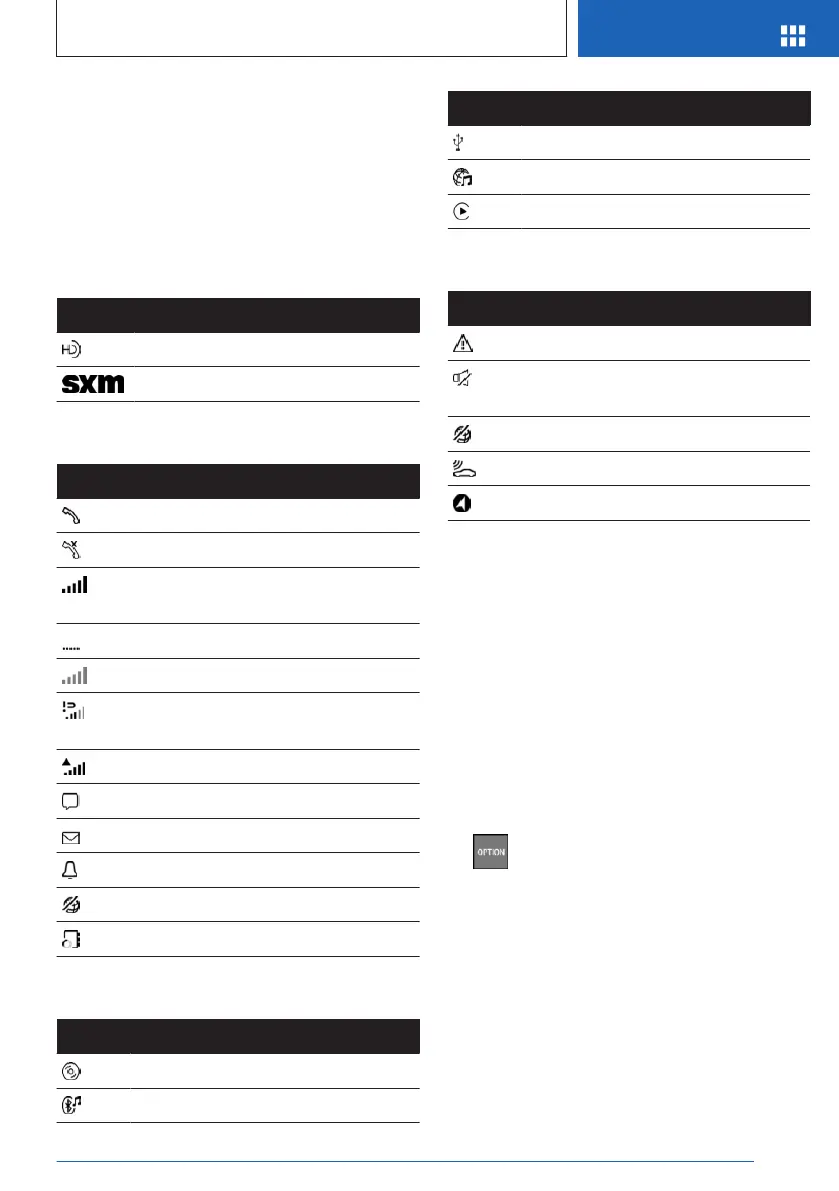
Radio symbols
Icon Meaning
HD Radio station is being received.
Satellite radio is switched on.
Telephone symbols
Icon Meaning
Incoming or outgoing call.
Missed call.
Signal strength of mobile phone net-
work.
Network search.
Mobile phone network is not available.
The critical charge state of the mobile
phone has been reached.
Roaming is active.
SMS text message received.
Message received.
Reminder.
Sending not possible.
Contacts are being loaded.
Entertainment symbols
Icon
Meaning
CD/DVD drive.
Bluetooth audio.
Icon Meaning
USB device.
Online Entertainment.
Apple CarPlay.
Other symbols
Icon Meaning
Check Control message.
The sound output has been switched
off.
Encrypted connection not active.
Request for the current vehicle position.
Checking the current vehicle position.
Split screen, split screen display
General information
Additional information, for instance information
from the trip computer can be displayed in sev-
eral menus on the right side of the screen dis-
play, referred to as the split screen.
The additional information remains visible
even when switching to another menu on the
split screen.
Turning on/off
1.
Press the button.
2. "Split screen"
Selecting the display
The display can be selected in menus which
support the split screen function.
1.
Tilt the Controller to the right until the split
screen is selected.
2. Press the Controller.
3. Select the desired setting.
Seite 35
iDrive
AT A GLANCE
35
Online Edition for Part no. 01405A540A1 - II/22








 To Next Page