Specifying the number of displays
It is possible to specify the number of displays.
1. Tilt the Controller to the right until the split
screen is selected.
2. Press the Controller.
3. "Personalize menu"
4. Select the desired setting.
5. Tilt the Controller to the left.
Control elements
Overview
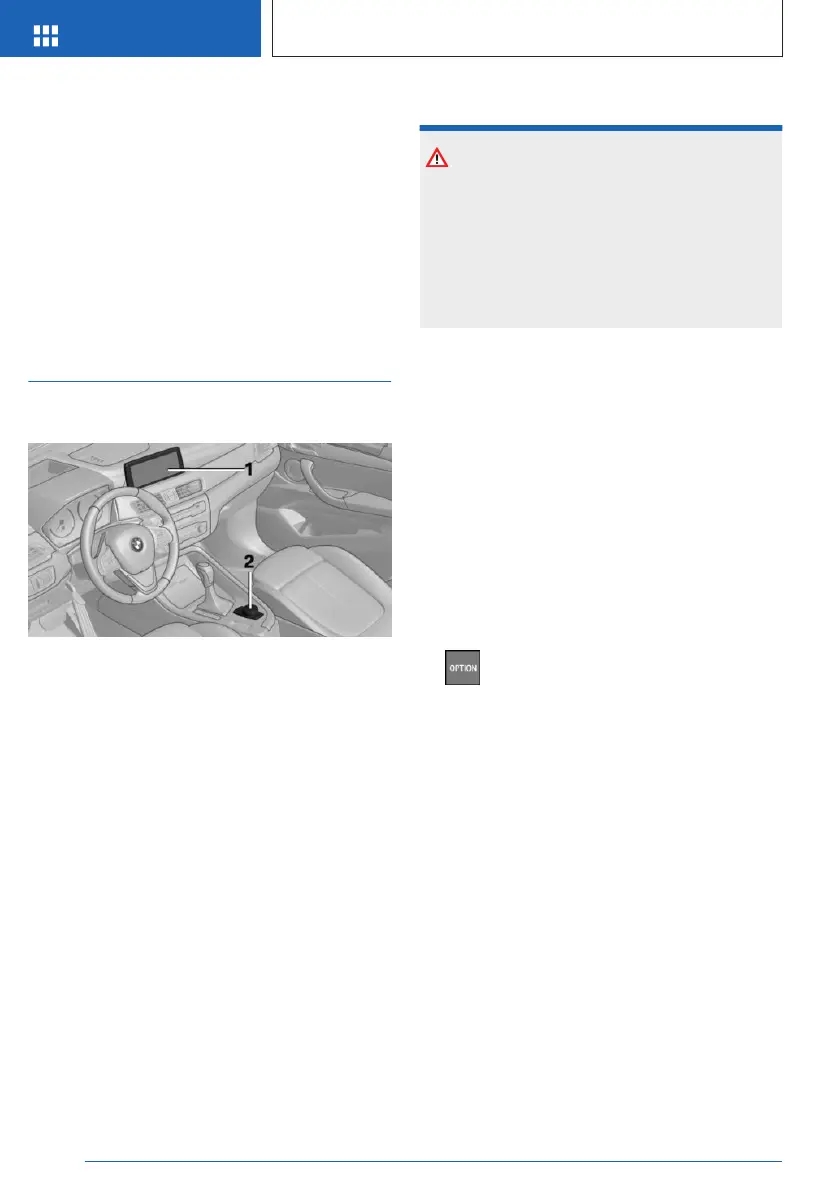
1 Control Display
2 Controller
Control Display
General information
To clean the Control Display, follow the vehicle
care instructions, refer to page 285.
In the case of very high temperatures on the
Control Display, for instance due to intense so-
lar radiation, the brightness may be reduced
down to complete deactivation. Once the tem-
perature is reduced, for instance through
shade or air conditioning system, the normal
functions are restored.
Safety information
NOTICE
Objects in the area in the front of the Control
Display can slip and damage the Control Dis-
play. There is a risk of damage to property,
among other potential damage. Do not place
objects in the area in front of the Control Dis-
play.
Switching on/off automatically
The Control Display is switched on automati-
cally when the vehicle is unlocked or as soon
as the Control Display is needed for operation.
In certain situations, the Control Display is
switched off automatically, for instance if no
operation is performed on the vehicle for sev-
eral minutes.
Switching on/off manually
The Control Display can also be switched off
manually.
1.
Press the button.
2. "Turn off control display"
Press the Controller or any button on the Con-
troller to switch it back on again.
Controller with navigation system
General information
The buttons can be used to open the menus
directly. The Controller can be used to select
menu items and enter the settings.
Operation
▷
Turn to switch between menu items, for ex-
ample.
Seite 36
AT A GLANCE
iDrive
36
Online Edition for Part no. 01405A540A1 - II/22




 To Next Page