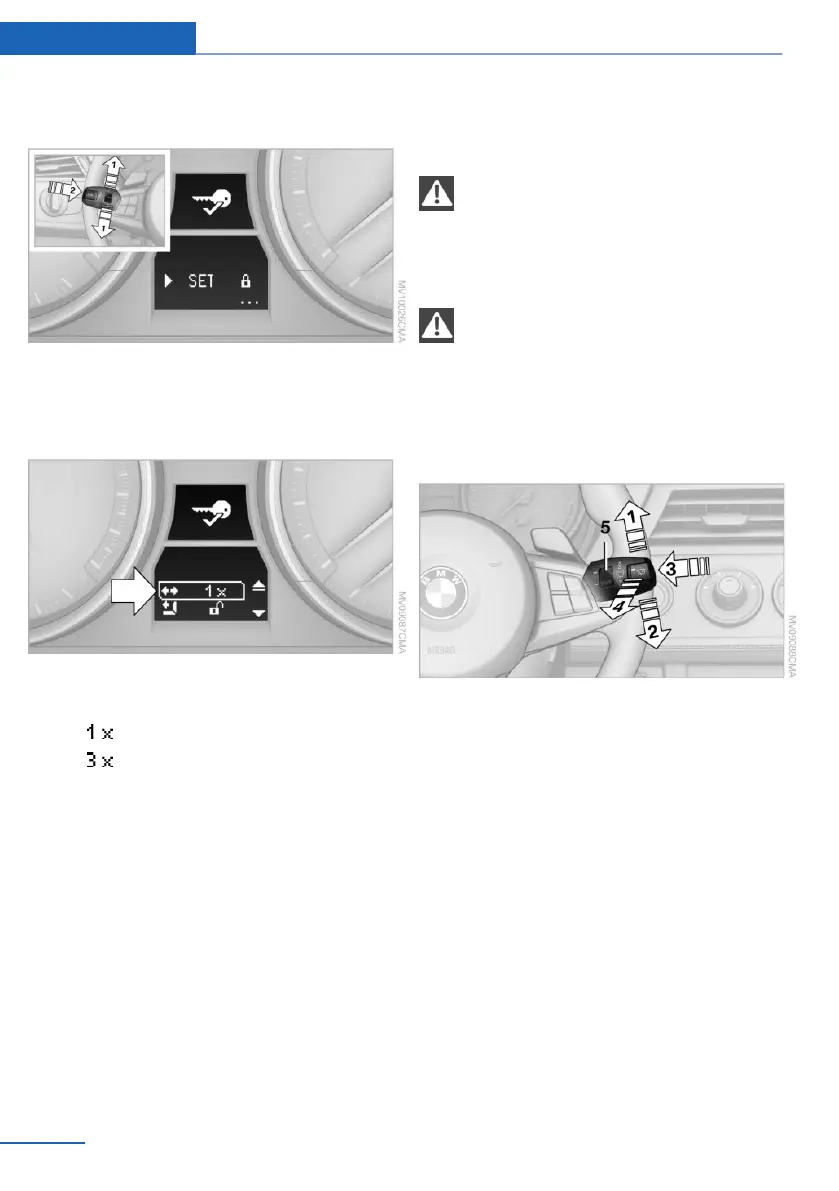
bol appears in the display, accompanied by
the word "SET".
3. Press button 2.
4. Lightly push button 1 in the turn indicator
lever down repeatedly until the symbol ap‐
pears in the display.
5. Press button 2.
6. Use button 1 to select one of the following:
▷ Turn signal flashes once.
▷ Triple turn signal.
7. Press button 2.
The setting is stored for the remote control
currently in use.
The setting is stored for the remote control
currently in use.
Washer/wiper system
Notes
Do not switch on the wipers if frozen
Do not switch on the wipers if they are
frozen onto the windshield; otherwise, the
wiper blades and the windshield wiper motor
may be damaged.◀
Do not use the wipers on a dry wind‐
shield
Do not use the wipers on a dry windshield; oth‐
erwise, the wiper blades may wear more rap‐
idly or become damaged.◀
At a glance
1 Switching on wipers
2 Switching off wipers or brief wipe
3 Activating/deactivating intermittent wipe or
the rain sensor
4 Cleaning the windshield and headlamps
5 Setting speed for intermittent wipe or sen‐
sitivity of the rain sensor
Switching on wipers
Press the lever upward, arrow 1.
The lever automatically returns to its initial po‐
sition when released.
Normal wiper speed
Press once.
The system switches to operation in the inter‐
mittent mode when the vehicle is stationary.
Seite 52
Controls Driving
52
Online Edition for Part no. 01 40 2 957 378 - X/14



 To Next Page