Settings and information
Operating concept
Certain settings and information can only be
called up when the ignition is switched on. A
number of settings cannot be made while driv‐
ing.
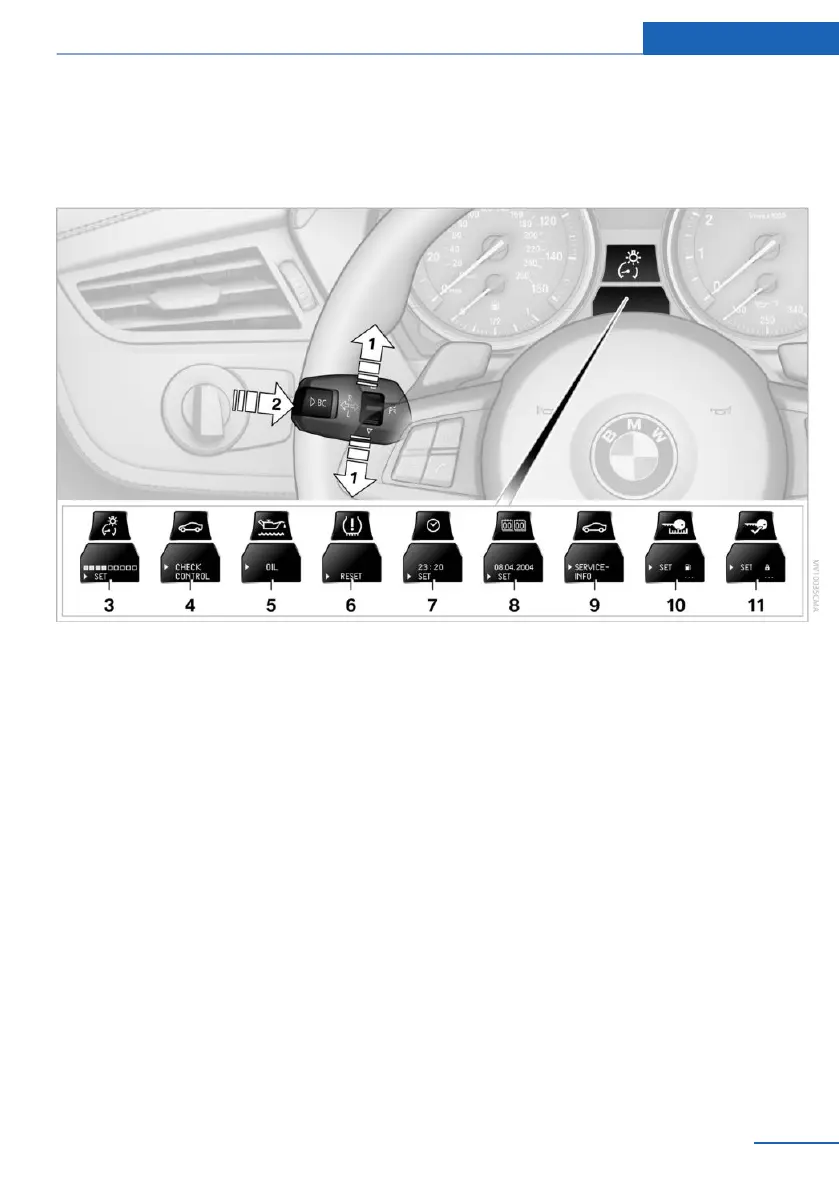
1 Button for:
▷ Selecting the display
▷ Setting values
2 Button for:
▷ Confirming selected display or set val‐
ues
▷ Calling up computer information 64
3 With the lights switched on: dimming the
instrument lighting 73
4 Calling up Check Control 68
5 Checking the engine oil level 166
6 Initializing the Flat Tire Monitor 78
Resetting the Tire Pressure Monitor 79.
7 Setting the time 66
8 Setting the date 67
9 Viewing service requirement display 67
10 Setting formats and units of measure, re‐
setting to factory settings 66
11 Changing settings
▷ Confirmation signals when locking and
unlocking the vehicle 24
▷ Response during unlocking proce‐
dure 22
▷ Automatic locking 26
▷ Headlamp courtesy delay feature 70
▷ Daytime running lights 71
▷ Triple turn signal activation 51
▷ Seat memory 40
Exiting displays
The external temperature reading and the time
reappear when you press button 2 or if you
make no entries within approx. 15 seconds. If
required, complete the current setting first.
Seite 65
Displays Controls
65
Online Edition for Part no. 01 40 2 957 378 - X/14



 To Next Page