Automatic climate control
with enhanced features
Overview
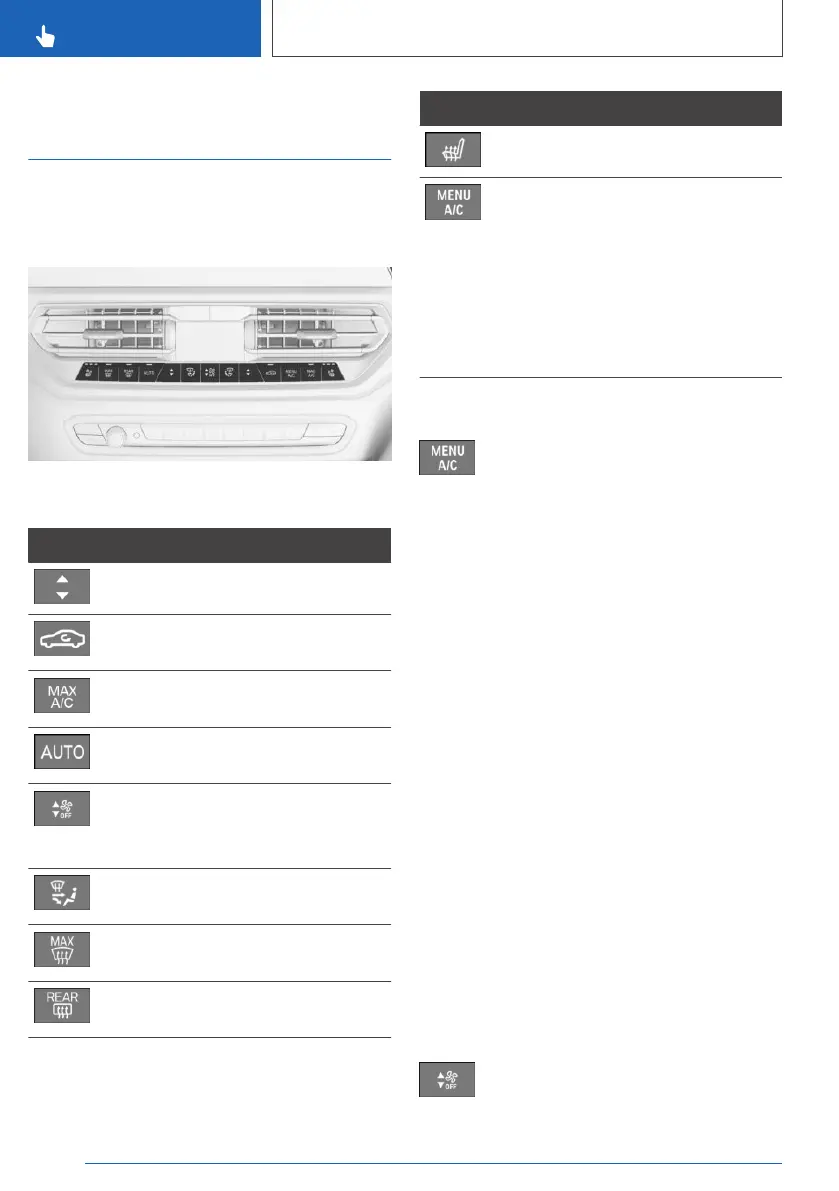
Buttons in the vehicle
Climate control functions
Button Function
Temperature, refer to page 211.
Recirculated-air mode, refer to
page 213.
Maximum cooling, refer to
page 212.
AUTO program, refer to
page 212.
Air flow, manual, refer to
page 213.
Switching off, refer to page 210.
Air distribution, manual, refer to
page 214.
Defrost and defog the wind‐
shield, refer to page 214.
Rear window defroster, refer to
page 214.
Button Function
Seat heating, refer to page 108.
Climate control operation, refer
to page 211.
Opening the Climate menu, re‐
fer to page 210.
For the following settings, for in‐
stance: upper body temperature
adjustment, parked-car ventila‐
tion, air conditioning.
Opening the Climate menu
Press the button.
The Climate menu is displayed.
For example, the following climate control func‐
tions can be accessed via the Climate menu:
▷ Heating/ventilation.
▷ Air quality.
▷ Seats/surfaces.
▷ Parked-car ventilation/heating
▷ Air conditioning.
Individual settings can be entered for some of
the climate functions, e.g., switching on/off, in‐
tensity.
Switching on/off
Switching on
Press any button except for the following:
▷ Menu.
▷ Rear window defroster.
▷ Lower air flow button side.
▷ Seat heating.
Switching off
Press and hold the lower button until
the control switches off.
Seite 210
CONTROLS
Climate control
210
Online Edition for Part no. 01402779113 - II/19



 To Next Page