5. CHANGING THE MASTER / DEFAULT SETTINGS.
There are various master / default settings that can be changed by entering the default settings.
To enter these settings, turn off the thermostat by pressing the button. Then press and hold the
button for 3-5 seconds until the A1 appears on the screen. You are now in settings mode and if
you don’t press any button for 5 seconds the display reverts back to off mode.
Press button to switch to next option and press or buttons to adjust the data. If you wish
to exit the settings without waiting 5 seconds press the button.
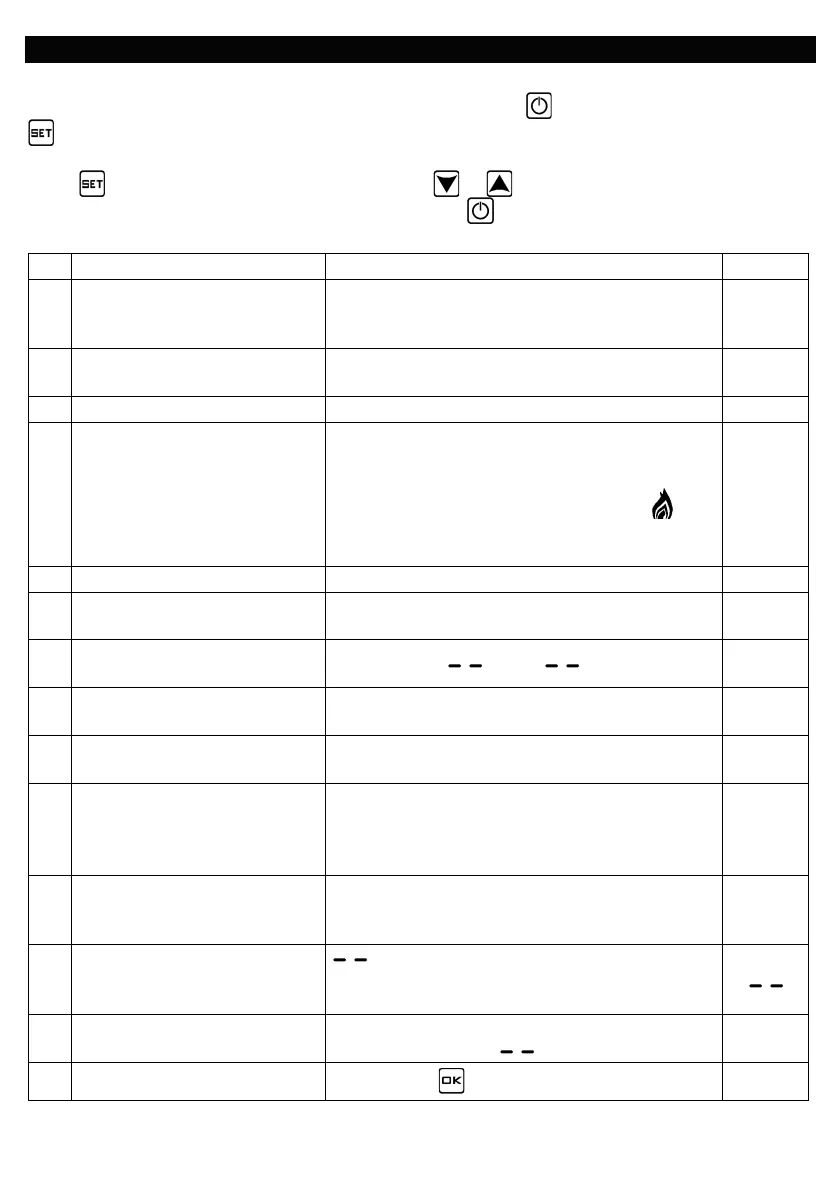
A1 Temperature calibration
-9⁰C to +9⁰C in 0.5⁰C steps. (Can be used to
tune temperature reading so it matches another
0⁰C
A2
Differential between set point
and On and Off
0.5⁰C - 2.5⁰C in 0.5⁰C steps. 0.5⁰C
Floor sensor differential
A4 Sensors used
N1= Built in sensor only. N2= Floor sensor only
N3= Built in sensor and floor sensor.
If floor sensor temperature is higher than its set
point (A6) load will turn off (indicated by
flashing) until temperature drops when heating
will continue until room temperature is reached.
N3
0 = half lock 1 = full lock
A6
Maximum set point of floor
sensor.
5⁰C - 45⁰C 27⁰C
A7
Minimum set point of floor
sensor.
1⁰C - 10⁰C or ( = Not active) 5⁰C
A8
Minimum set point of internal
sensor.
1⁰C - 10⁰C 5⁰C
A9
Maximum set point of internal
sensor.
20⁰C - 45⁰C 30⁰C
AA Power Cut function.
0 = Power heating as per controller memory.
1 = Shut down controller after power cut.
2 = Shutdown heating but turn controller on
0
AB Programming selection
0 = 5 + 2 (same settings Mon-Fri + Sat-Sun)
1 = 6 + 1 (same settings Mon-Sat + Sun)
2 = 7 (different settings each day Mon-Sun)
0
AC Window Opening detection
10 - 20⁰C = Sudden drop set point at which
AD Window Opening OFF period
5 - 40 minutes (only if AC above is set to a
temperature and not ).
10
AE Factory Reset
Press & hold key until whole screen shows.


 To Next Page
 Loading...