Need help?
Do you have a question about the BN Thermic B16C and is the answer not in the manual?
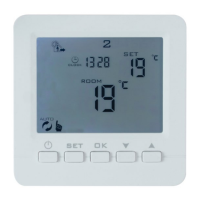
Overview of the B16C Thermostat, its features, and programmable capabilities for underfloor heating.
Step-by-step guide on setting the thermostat's time and day of the week using its buttons.
Displays the default pre-set times and temperatures for different periods and days.
Instructions on how to manually adjust or program the thermostat's time and temperature periods.
Explains how to operate the thermostat in different modes like Auto and Manual.
Details how to lock the thermostat's buttons to prevent unauthorized changes.
Describes the function and setup for the Holiday Mode to maintain a lower temperature.
Crucial safety guidelines for electrical installation and general handling of the thermostat.
General safety advice for handling, use, and precautions against misuse.
Guidance on selecting the optimal mounting location for the thermostat.
Detailed instructions on physically mounting and connecting the thermostat.
Detailed list and explanation of master/default settings that can be changed, including calibration, differentials, and modes.
Step-by-step guide for replacing the internal battery that maintains settings during power loss.
Explains fault codes E1 and E2 related to sensor issues and their impact on heating.
The BN Thermic B16C is a programmable controller designed for underfloor heating systems, offering flexible time and temperature control. This device is engineered to provide reliable performance when used according to its instructions and properly maintained. It is crucial for users to retain the instructions for future reference.
The B16C functions as a 7-day, 6/1-day, or 5/2-day programmable room thermostat, allowing for up to four time and temperature changes each day. Its primary role is to automatically regulate underfloor heating based on both air temperature and input from a floor sensor. All programmed settings are stored within the controller and are maintained by a battery backup, ensuring that settings are not lost during power outages.
Programming Flexibility: The controller offers three programming selections: 5+2 days (default), 6+1 days, or 7 days. In the 5+2 day mode, Monday to Friday settings are identical, with separate programming for Saturday and Sunday. The 6+1 day mode allows for identical settings from Monday to Saturday, with a distinct program for Sunday. The 7-day mode enables different settings for each day of the week.
Time and Temperature Adjustment: Users can easily set the current time and day number. To adjust programmed time and temperature periods, the thermostat must be on. By pressing and holding the SET button, users can enter programming mode, where they can modify the hours, minutes, and desired temperatures for each of the four daily periods. The display indicates which days are being programmed (e.g., "12345" for weekdays, "6+7" for Saturday and Sunday). If no button is pressed for approximately 5 seconds, the controller automatically saves the settings and exits programming mode.
Run Modes: The B16C supports multiple operating modes:
Holiday Mode: The holiday mode allows users to set a countdown of days and a lower temperature set point for when they are away. This feature ensures energy savings while preventing the heating system from being completely off. To activate, users access the holiday settings, change the status from Off to On, set the number of days they will be away, and then set the desired temperature for the holiday period. A specific symbol on the screen indicates that holiday mode is active. It can be exited early by pressing the SET button.
Locking the Controller: The controller includes tamper-resistant features with two lock settings:
Window Opening Detection: This feature can be configured to detect a sudden drop in temperature, indicating an open window. When detected, the heating can be set to turn off to conserve energy. Users can also specify an "OFF period" for this function, ranging from 5 to 40 minutes, during which the heating remains off after a window opening event.
Power Cut Function: Users can configure how the controller behaves after a power cut:
Battery Replacement: The B16C contains an internal battery that preserves settings during power failures. If the settings are not remembered after a power cut, the battery needs replacement. This process involves ensuring the mains power is off and isolated, removing the front screen panel, disconnecting the internal plug, replacing the CR1220 Lithium Cell battery (ensuring correct polarity), and then reassembling the unit.
Temperature Calibration: The temperature reading can be calibrated from -9°C to +9°C in 0.5°C steps. This allows users to fine-tune the thermostat's reading to match another thermostat or a known accurate temperature source.
Differential Settings:
Sensor Configuration: The controller supports various sensor configurations:
Sensor Fault Codes: The thermostat displays E1 or E2 fault codes if the sensors are faulty or not connected. In such cases, the thermostat will cease heating until the fault is resolved. If the N3 sensor option is selected, a floor sensor must be present and operational; otherwise, an E2 fault code will be displayed, and the system will not function.
Factory Reset: A factory reset option is available, which can be activated by pressing and holding the OK key until the entire screen shows, restoring all settings to their default values.
 General
| Mounting | Wall Mounted |
|---|---|
| Switching Current | 16A |
| Input Voltage | 230V AC |
| Output Voltage | 230V AC |
| Protection Class | IP20 |
| Operating Temperature | 0 - 50°C |

 To Next Page