S250 Bobcat Loader
OI-9 Operation & Maintenance Manual
INSTRUMENT PANEL IDENTIFICATION (CONT’D)
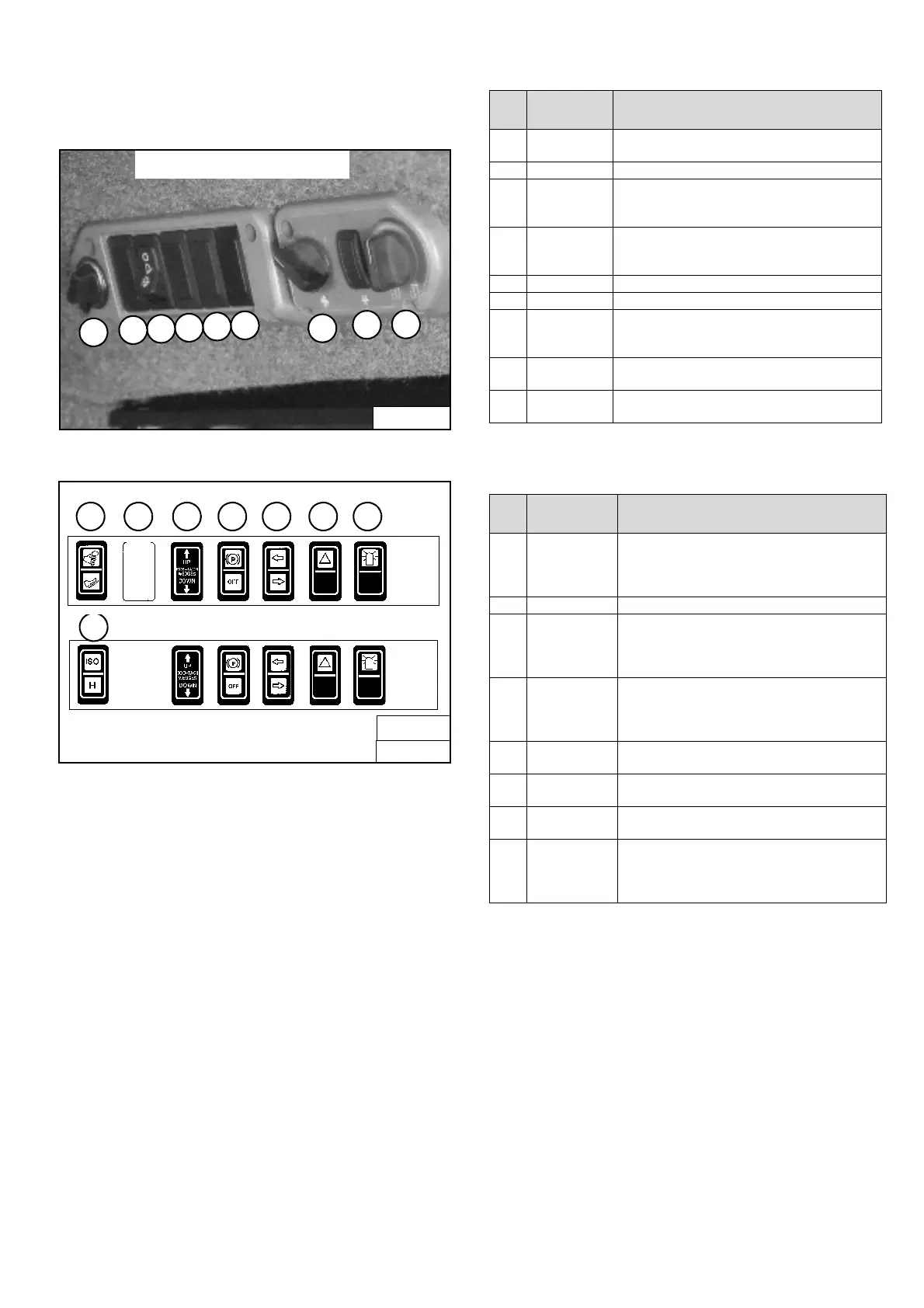
Option And Field Accessory Panels (If Equipped)
Figure OI-6
Figure OI-7
NOTE: Parking Brake (Item 13) [Figure OI-7] is
Standard on all loaders.
Side Accessory Panel [Figure OI-6].
Front Accessory Panel [Figure OI-7].
P16000
SIDE ACCESSORY PANEL
3
1
2
4
5
6
7
8
9
B-15993B
OR
17
B-15993
FRONT ACCESSORY PANEL
10
11 12 13 14 15 16
REF.
NO.
DESC. FUNCTION / OPERATION
1. POWER
PLUG
Provides a 12V receptacle for accessories.
2. NOT USED ---
3. FRONT
WIPER
Press the top of the switch to start the front
wiper (press and hold for washer fluid). Press
the bottom of the switch to stop the wiper.
4. REAR WIPER Press the bottom of the switch to start the rear
wiper. Press the top of the switch to provide
washer fluid to clean the rear window.
5. NOT USED ---
6. NOT USED ---
7. FAN MOTOR Turn clockwise to increase fan speed;
counterclockwise to decrease. There are four
positions; OFF-1-2-3.
8. AIR COND.
SWITCH
Press top of switch to start; bottom to stop. Fan
Motor (Item 7) must be ON for A/C to operate.
9. TEMP.
CONTROL
Turn clockwise to increase the temperature;
counterclockwise to decrease.
REF.
NO.
DESC. FUNCTION / OPERATION
10. ADVANCED
CONTROL
SYSTEM
(ACS)
Press the top to select Hand Controls; bottom to
select Foot Controls.
11. NOT USED - - -
12. POWER
BOB-TACH
Press and hold the up arrow to disengage the
the Bob-Tach wedges. Press and hold the down
arrow to engage the wedges into the mounting
frame holes.
13. PARKING
BRAKE
(Standard on
all Loaders)
Press the top to engage the PARKING BRAKE;
bottom to disengage.
14. TURN SIGNAL
INDICATORS
Indicates left or right TURN SIGNALS are ON.
15. HAZARD
LIGHTS
Press the top to turn the HAZARD LIGHTS ON;
right side bottom to turn OFF.
16. ROTATING
BEACON
Press the top to turn the ROTATING BEACON
ON; bottom to turn OFF.
17. SELECTABLE
JOYSTICK
CONTROL
(SJC)
Press the top to select ‘ISO’ Control Pattern;
bottom to select ‘H’ Control Pattern.



 To Next Page
 Loading...