e. Hide-indicator Function
When video recorder is working, press "
Audio-recording /lndicator switch" for 3 seconds,
then the indicator is turnned off.
Press "Audio recording / Indicator switch" for 3
seconds, the indicator will be restarted and begin
flashing.
This operation doesn't
affect the working state
of the camera.
Warm Tips:
When in ow power, the indicator will flash quickly,
and stop video & audio recording automatically,
then store files and power off.
When it's power up & no TF card inside, the blue
indicator will keep on flashing.
When placed in standby status over 3 minutes, it
will power off automatically.
Part III Product Introduction
I. The operation of reset button
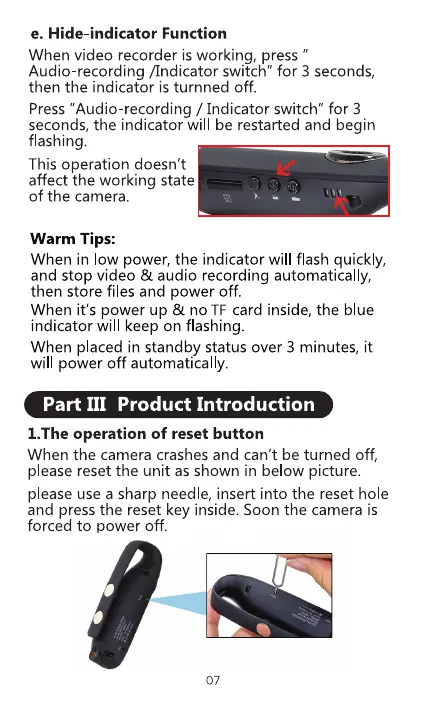
When the camera crashes and can't be turned off,
please reset the unit as shown in below picture.
please use a sharp needle, insert into the reset hole
and press the reset key inside. Soon the camera is
forced to power off.
07



 To Next Page