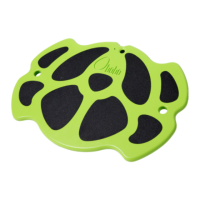
First time on BOBO Detailed Manual Guide
Charge the battery
• Make sure the battery is charged BEFORE you use the BOBO.
• Find the charger hole, located on the front panel of the BOBO.
• Using the cable supplied, connect the BOBO to a suitable USB
power source. The status light will pulse orange while charging.
• When the status light stops pulsing (steady orange the BOBO is
fully charged.
• Charging the Tablet battery: Using the cable supplied,
charge the tablet with the DC cable.
Pair with the tablet
Pairing is automatic! Do not try to pair the BOBO with the tablet
through the tablet’s Settings tool. If you do the BOBO will not be able to
communicate with the tablet. Just follow the instructions below:
• Make sure the tablet’s Bluetooth is enabled.
• Turn on your BOBO.
• Wait 10-20 seconds and verify that the egg on the bottom
right corner of the tablet wallpaper responds to the BOBO’s
movements. If the egg does not respond, wait another minute.
BOBO Games
In the “BOBO-INDEX” app you will find a list of many free Android tilt
based games that are compatible with BOBO. You will also find all the
BOBO’s games and training programs.


 To Next Page